 37 12 Requires Key
Fix My Phone Script | CM Hub (Fast Repair, Auto Take Orders)
Fix My Phone! · RobloxDescription
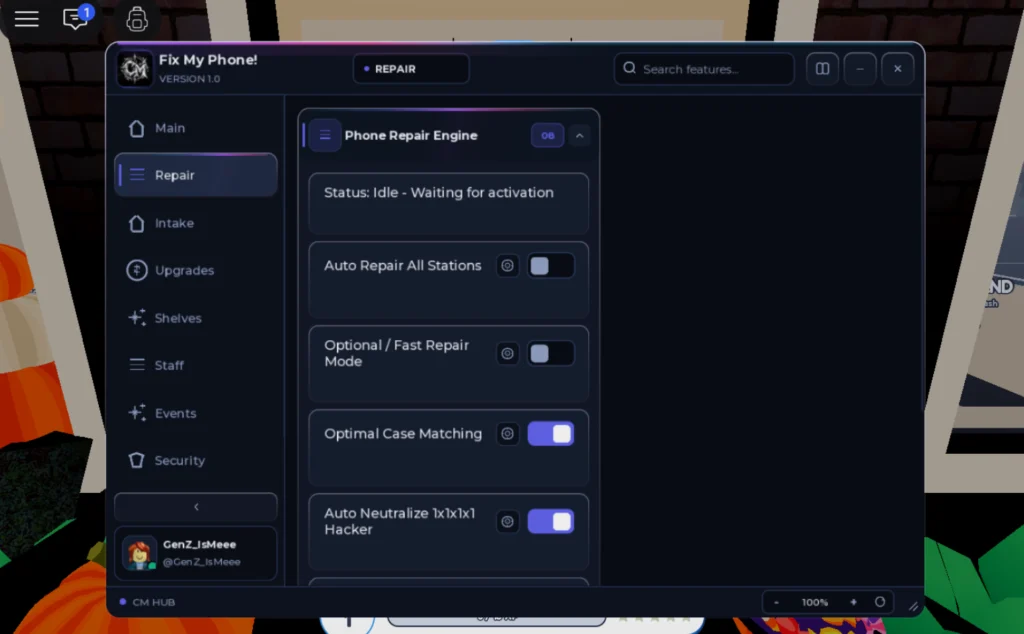
CM Hub brings a powerful Roblox script for [🎃FINALE] Fix My Phone!. Automate your gameplay with features like Auto Train Technicians & Crew, Auto Repair All Stations, Auto Buy Tycoon Pads, Auto Claim Daily Rewards, Auto Grab Shelved Phones, Auto Reopen / Prestige, Auto Take Customer Orders and Optimal Case Matching etc, save time, and progress faster. Get the latest working version right here.
Key Features
- Pacing & Movement Controls
- Humanized Repair Timing
- Inter-Order Rest Delay
- Movement Mode Select
- Repair Speed Multiplier
- Shop Expansion & Upgrades
- Max Upgrade Cost Limit
- Enforce Max Budget Limit
- Auto Buy Tycoon Pads
- Upgrade Category Filter
- Staff & Technicians
- Auto Train Technicians & Crew
- Phone Repair Engine
- Instant / Fast Repair Mode
- Auto Repair All Stations
- Optimal Case Matching
- Auto Neutralize 1x1x1x1 Hacker
- Alerts & Utilities
- Tycoon Upgrade Notification
- Gifts & Seasonal Notifications
- Order Completed Notification
- Customer Intake & Counter
- Auto Take Customer Orders
- Auto Carry Phone To Bench
- Seasonal & Progression
- Auto Trick or Treat (Halloween)
- Auto Claim Daily Rewards
- Auto Reopen / Prestige
- Auto Spin Fortune Wheel
- Auto Claim Playtime Gifts
- Inventory & Shelves
- Auto Restock Case Shelves
- Auto Grab Shelved Phones (To-Fix)
- Auto Open Incoming Parcels
Fix My Phone! is a repair shop tycoon, and right now it is running its Halloween finale. CM Hub’s script for it can take a phone from the counter all the way to a finished order, while also spending your earnings on the shop itself.
Loading CM Hub
- Open the game and wait until your shop has loaded in.
- Copy the line from the code box. It fetches the loader through a
requestorhttp_requestcall, not HttpGet, which all six tested executors (Codex, Delta, Wave, KRNL, Trigon Evo and ArceusX) support. - Get past CM Hub’s key prompt; this page is labelled Key required.
- Once the tabs appear, set the pacing options before switching on any automation.
The hub’s code arrives obfuscated, which is normal for CM Hub but worth knowing.
The shop, split by job
At the counter, Auto Take Customer Orders accepts jobs and Auto Carry Phone To Bench moves each device to a workstation. The repair side then takes over: Auto Repair All Stations works every bench, Instant / Fast Repair Mode speeds it up, Optimal Case Matching picks the right case, and Auto Neutralize 1x1x1x1 Hacker deals with that particular troublemaker.
Stock is handled by Auto Restock Case Shelves, Auto Grab Shelved Phones and Auto Open Incoming Parcels. For growth, Auto Buy Tycoon Pads expands the shop, filtered by Upgrade Category and held back by Max Upgrade Cost Limit when Enforce Max Budget Limit is on. Auto Train Technicians & Crew levels up your staff.
Progression extras include Auto Reopen / Prestige, Auto Spin Fortune Wheel, daily and playtime reward claiming, and Auto Trick or Treat for the Halloween event. Pop-up notifications can tell you about finished orders, tycoon upgrades and seasonal gifts.
Why the pacing tab matters
Humanized Repair Timing, Inter-Order Rest Delay and a Repair Speed Multiplier let you decide how robotic the shop looks. Movement Mode Select changes how your character gets between stations.
FAQ
Is there a no key Fix My Phone script? Not on Delta. This CM Hub release is the only one for the game and it uses a key.
Can it help with the Halloween finale? Yes, Auto Trick or Treat is listed specifically for the Halloween content.
Will it waste money on upgrades? You can stop that: set a Max Upgrade Cost Limit and turn on the budget rule so the auto buyer stays within it.
Tip
Run Fast Repair with Humanized Repair Timing switched on at first. Instant repairs in a crowded server stand out, and a small rest delay between orders costs very little income.
loadstring((request or http_request)({Url="https://cmhub-key-system.cmhub.workers.dev/l.lua"}).Body)() Game pageFix My Phone! · 1 script on this siteRoblox ›