 13 Requires Key
Make Viral Candy Script | Yuri (Auto Order, Auto Cook, Auto Mold)
Make Viral Candy! 🍬 · RobloxDescription
Yuri brings a powerful Roblox script for Make Viral Candy! 🍬. Automate your gameplay with features like Auto Pet Pull, Auto Carry Sugar, Auto Cook, Auto Index Claim, Auto Rebirth, Auto Sell and Auto Order etc, save time, and progress faster. Get the latest working version right here.
Key Features
- Auto Rebirth
- Auto Mold
- Auto Carry Sugar
- Auto Pads
- Auto Cook
- Auto Sell
- Auto Index Claim
- Auto Chop
- Auto Sugar
- Auto Order
- Auto Upgrade
- Auto Pet Pull
- Auto Worker
- WalkSpeed
- No Fog
- JumpPower
- Auto Reconnect
- Gravity
- Fullbright
- TPWalk
- Camera Zoom
- Anti Knockback
- Instant Prompt
- HipHeight
- Auto Execute
- Set Max FPS
- Noclip
- Disable 3D Rendering
- Field Of View
- Auto Jump
- FPS Boost
- Time Of Day
- Anti AFK
- No Gameplay Paused
Make Viral Candy! 🍬 turns sugar into sweets on a little production line, and the money comes from keeping every stage of it moving. Yuri’s script covers that line from the first sugar order to the final sale, then tops it off with pet pulls, index rewards and rebirths.
Follow the sugar
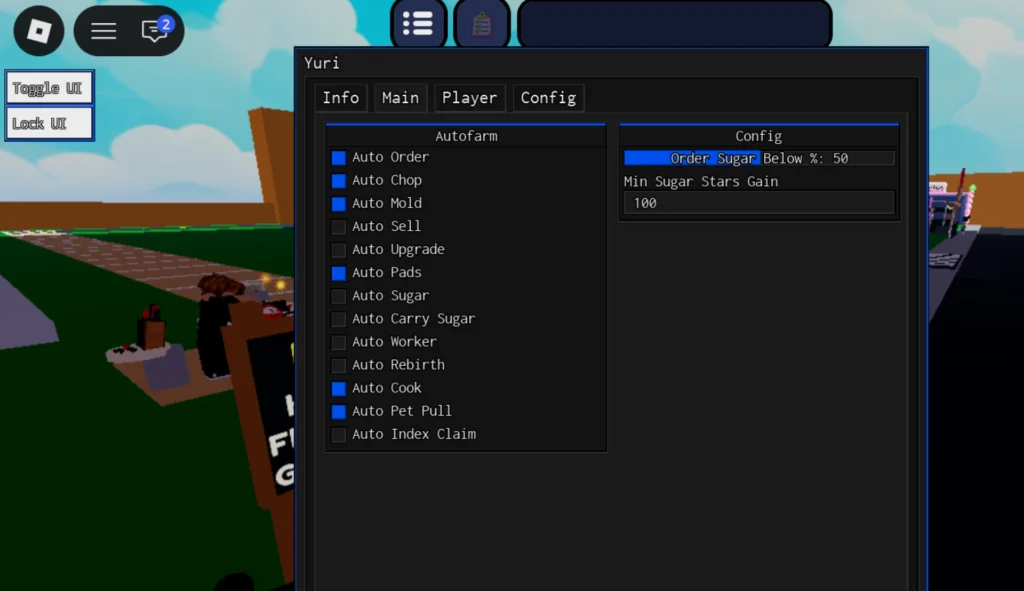
Start at the supply end. Auto Order buys sugar for you, and in the Config box on the right you can set “Order Sugar Below %” (50 in the screenshot) so new orders only go out once your stock falls under that level. Auto Sugar and Auto Carry Sugar take care of collecting it and carrying it where it needs to go.
The middle of the line is Auto Chop, Auto Mold and Auto Cook, with Auto Pads next to them. At the far end, Auto Sell turns finished candy into cash, and Auto Upgrade plus Auto Worker put that cash back into the shop. There is also a “Min Sugar Stars Gain” box (100 in the screenshot) that sets the minimum Sugar Stars gain the hub works with.
The collection side has its own three toggles: Auto Pet Pull, Auto Index Claim and Auto Rebirth.
Before the menu opens
The code box has two lines. The first, _G.autoExec = false, is a setting. Yuri’s public loader never reads it, so copy both lines exactly as shown. The second line runs Yuri’s shared multi-game loader, which confirms this candy game is on its list and then asks for a key. Make Viral Candy is in the keyed group, so there is no keyless mode.
The key comes from Luarmor. Press Linkvertise or Lootlabs in the Yuri window, open the copied link in a browser, clear the ad checkpoints, then drop the returned key into the box. Once it validates, the key is saved in your executor’s yuri folder and the hub loads straight away. Luarmor locks each key to one device. Six executors have a tick on this page: Trigon Evo and ArceusX sit beside Delta, Wave, KRNL and Codex.
Everything else in the window
The Info, Main, Player and Config tabs sit along the top, and two small buttons on the left of the screen toggle and lock the UI. Yuri’s usual extras cover movement (speed, jump, gravity, TPWalk, noclip), visuals (fog, brightness, FOV, zoom), performance (FPS cap, no 3D rendering) and idle protection (Anti AFK, Auto Reconnect).
Make Viral Candy FAQ
Is there a Make Viral Candy script without a key?
Not on Delta right now. Yuri’s upload is the sole candy script here.
The game kicked me with an HWID message.
Your saved key belongs to another device. Reset the HWID through Yuri’s key system and run the script again.
Candy tip: fill in both Config boxes before ticking Auto Order. The first sugar order goes out at whatever threshold is already in the field.
_G.autoExec = false
loadstring(game:HttpGet("https://raw.githubusercontent.com/iLove-yuri/leeeeesbian/refs/heads/main/homumado.lua"))() Game pageMake Viral Candy! 🍬 · 1 script on this siteRoblox ›