 7 Requires Key
Escape The Walls Script | Plak (Auto Mine, Auto Farm, Auto Boss)
Escape The Walls · RobloxDescription
Plak brings a powerful Roblox script for [🚨] Escape The Walls. Automate your gameplay with features like Auto Boss, Auto Mine, Auto Equip Best, Auto Research, Auto Deposit and Auto Relic etc, save time, and progress faster. Get the latest working version right here.
Key Features
- Auto Buy Tool
- Auto Vacuum
- Auto Chest
- Auto Equip Best
- Auto Farm
- Auto Relic
- Auto Deposit
- Auto Storage
- Auto Mine
- Auto Research
- Auto Tutorial
- Auto Boss
- Auto Vacuum
- Walk Speed
Escape The Walls is a co-op incremental about one thing: smash the wall, gather what breaks off, upgrade, repeat until you’re out of the room. This Escape The Walls script from Plak mines and cashes in for you, and it’s the only one we list for the game.
Finding your way around Plak’s menu
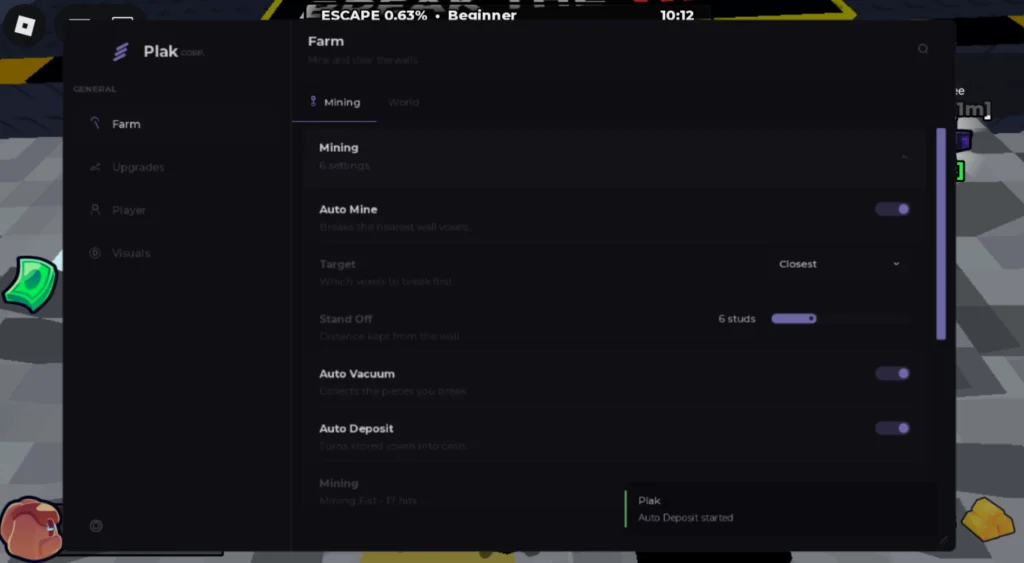
The window (“Plak CORP.”) has four pages on the left: Farm, Upgrades, Player and Visuals. Farm is subtitled “Mine and clear the walls” and has two tabs, Mining and World. The Mining block holds six settings, and the screenshot shows what each one does:
- Auto Mine breaks the nearest wall voxels.
- Target picks which voxels go first (Closest is selected).
- Stand Off is how far you stay from the wall, 6 studs by default on the slider.
- Auto Vacuum collects the pieces you break off.
- Auto Deposit turns stored voxels into cash. A “Plak: Auto Deposit started” toast confirms it.
Underneath, a Mining line names your current tool and how many hits it needs (Mining Fist, 17 hits).
The rest of the listed options are Auto Buy Tool, Auto Equip Best, Auto Research, Auto Relic, Auto Chest, Auto Storage, Auto Boss, Auto Farm, Auto Tutorial and a Walk Speed setting. The page lists Auto Vacuum twice, so that’s 13 distinct options rather than 14.
Setting it up
The page says Key required, though the line itself contains no key. It is a FlowAuth bootstrap that downloads an encrypted runtime and looks for a key your executor has already set. Expect the key step to show up once that runtime starts. On about one launch in twenty it also reports a small load summary back to FlowAuth: phone or desktop, plus download timings. Tested executors: Delta, Wave, Codex, KRNL, ArceusX and Trigon Evo.
Escape The Walls questions
Is it the same file as Plak’s Pave the Road script? The loader address is identical, so Plak runs one hub for both games. The features differ by game.
What does Stand Off change? Just your distance from the wall while Auto Mine works. Slide it up or down to change how close you stand while mining.
Tool tip: keep an eye on the hit count under Mining. While it stays high, switch on Auto Buy Tool before anything cosmetic, because a better tool means fewer swings per voxel and faster progress on the escape bar.
loadstring(game:HttpGet("https://flowauth.net/v1/loaders/22cb301da4b50eaf7e00d61e44a6ac85.lua"))() Game pageEscape The Walls · 1 script on this siteRoblox ›