 25 8 No Key
HEISTBLOX Script (Delta Mobile) – Inspector: Player ESP, Loot ESP, Weapons
HEISTBLOX · RobloxDescription
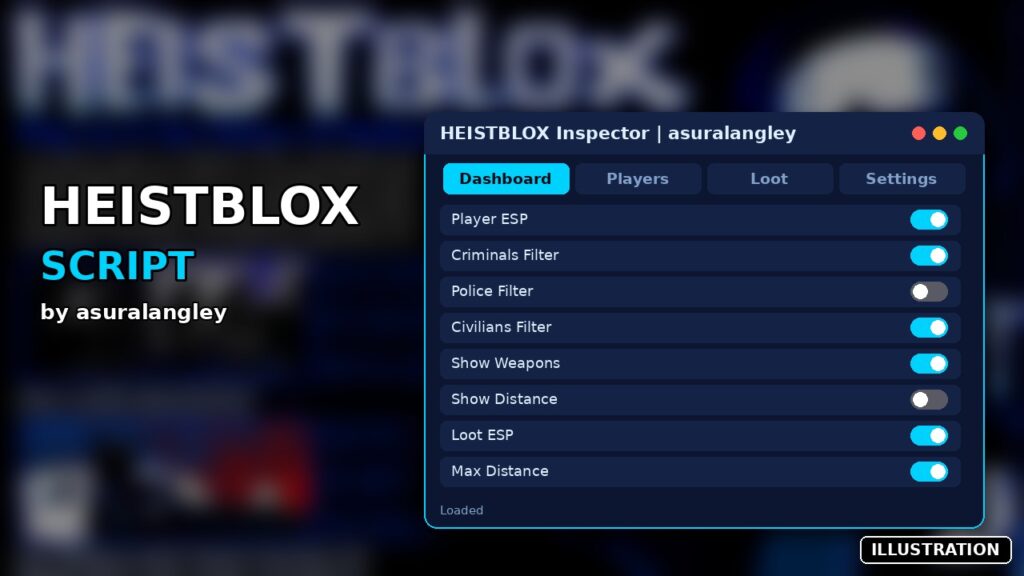
HEISTBLOX Inspector is a HEISTBLOX script you can run in Delta on Android, iOS or PC. It includes player esp, criminals filter, police filter and more. The menu uses WindUI; if name tags do not show at first, toggle Player ESP off and on again. Created by asuralangley. No key.
Key Features
- Player ESP with name tags
- Filter ESP by Criminals, Police or Civilians
- Show each player's weapons
- Show distance to players
- Loot ESP
- Adjustable refresh rate
- Maximum ESP distance slider
- RightShift to hide or show the menu
HEISTBLOX is an early-development cops-and-robbers shooter. Criminals rob the bank and try to escape with the loot, civilians run down the clock with tasks, and when the timer hits zero the police and SWAT move in. HEISTBLOX Inspector by asuralangley is a HEISTBLOX script that doesn’t shoot or farm anything. It tells you who’s who, what they’re carrying and where the loot is.
Tabs
- Dashboard
- An Inspector Status box and a Refresh All button.
- Players
- Enable Player ESP, separate switches for Criminals, Police and Civilians, Show Weapons and Show Distance. Name tags are red for criminals, blue for police and grey for civilians.
- Loot
- Enable Loot ESP, which tags every item in the current map’s loot folder in gold.
- Settings
- Refresh Rate (1–5), Maximum Distance (100–2000 studs, starting at 1000) and Automatic Updates.
Everything starts switched on. RightShift hides the window.
How it decides roles and weapons
A player’s role comes from the colour of the highlight the game puts on them. If there’s no highlight, the tag says Unknown. Weapons are simply the names of the tools in a player’s hands and backpack, shown under their name.
Loading
No key. The code box contains the full Inspector (v0.5), and its one outside download is the WindUI interface, pinned to version 1.6.66 on GitHub, so the window won’t change unexpectedly. It saves to a HeistbloxInspector folder. Delta leads the executor row; Fluxus, Codex, Arceus X and PC versions follow. As the page says, if name tags don’t appear the first time, switch Player ESP off and back on.
HEISTBLOX FAQ
Why does everyone show as Unknown? The game hasn’t given them a role highlight yet. That’s usually before a round has properly started. Press Refresh All once teams are set.
Does it have aimbot? No. It’s only information: names, roles, weapons, distance and loot.
Heist tip: as a civilian, keep Show Weapons on and the Police filter off. You’ll only see criminals’ tags and what they’re holding, so you can stay away from the ones with guns while you finish tasks.
-- HEISTBLOX INSPECTOR AIO v0.5
-- WindUI 1.6.66
-- Roblox Studio diagnostic edition
local Players = game:GetService("Players")
local Workspace = game:GetService("Workspace")
local RunService = game:GetService("RunService")
local LocalPlayer = Players.LocalPlayer
local PlayerGui = LocalPlayer:WaitForChild("PlayerGui")
-- CONFIGURATION
local Config = {
PlayerESP = true,
LootESP = true,
WeaponInfo = true,
RoleDetection = true,
ShowDistance = true,
Criminals = true,
Police = true,
Civilians = true,
Unknown = true,
RefreshRate = 1,
MaxDistance = 1000,
}
local Colors = {
Criminal = Color3.fromRGB(255, 50, 50),
Police = Color3.fromRGB(0, 150, 255),
Civilian = Color3.fromRGB(200, 200, 200),
Unknown = Color3.fromRGB(255, 255, 255),
Loot = Color3.fromRGB(255, 200, 50),
}
local RoleRGB = {
["255,50,50"] = "Criminal",
["0,150,255"] = "Police",
["200,200,200"] = "Civilian",
}
local RenderedPlayers = {}
local RenderedLoot = {}
local Stats = {
Players = 0,
Loot = 0,
Refreshes = 0,
}
-- WINDUI
local WindUI = loadstring(game:HttpGet(
"https://github.com/Footagesus/WindUI/releases/download/1.6.66/main.lua"
))()
local Window = WindUI:CreateWindow({
Title = "HEISTBLOX | Inspector",
Author = "AIO v0.5",
Icon = "shield",
Folder = "HeistbloxInspector",
Theme = "Dark",
Size = UDim2.fromOffset(700, 500),
MinSize = Vector2.new(550, 400),
Resizable = true,
ToggleKey = Enum.KeyCode.RightShift,
})
local Dashboard = Window:Tab({
Title = "Dashboard",
Icon = "layout-dashboard",
})
local PlayersTab = Window:Tab({
Title = "Players",
Icon = "users",
})
local LootTab = Window:Tab({
Title = "Loot",
Icon = "package",
})
local SettingsTab = Window:Tab({
Title = "Settings",
Icon = "settings",
})
-- DETECTION
local function getRole(character)
local highlight = character
and character:FindFirstChild("SpectatorHighlight")
if not highlight or not highlight:IsA("Highlight") then
return "Unknown"
end
local color = highlight.FillColor
local key = string.format("%d,%d,%d",
math.round(color.R * 255),
math.round(color.G * 255),
math.round(color.B * 255)
)
return RoleRGB[key] or "Unknown"
end
local function getWeapons(player)
local weapons = {}
local function inspect(container)
if not container then return end
for _, item in ipairs(container:GetChildren()) do
if item:IsA("Tool") then
table.insert(weapons, item.Name)
end
end
end
inspect(player.Character)
inspect(player:FindFirstChildOfClass("Backpack"))
return #weapons > 0 and table.concat(weapons, ", ") or "Unarmed"
end
local function getDistance(character)
local root = character
and character:FindFirstChild("HumanoidRootPart")
local localRoot = LocalPlayer.Character
and LocalPlayer.Character:FindFirstChild("HumanoidRootPart")
if not root or not localRoot then return nil end
return math.floor((root.Position - localRoot.Position).Magnitude)
end
-- PLAYER RENDERER
local function removePlayer(player)
local data = RenderedPlayers[player]
if data then
data.Billboard:Destroy()
data.Highlight:Destroy()
RenderedPlayers[player] = nil
end
end
local function createPlayer(player)
if player == LocalPlayer then return end
local character = player.Character
local root = character
and character:FindFirstChild("HumanoidRootPart")
if not root then return end
removePlayer(player)
local billboard = Instance.new("BillboardGui")
billboard.Name = "InspectorPlayerLabel"
billboard.Adornee = root
billboard.Size = UDim2.fromOffset(230, 65)
billboard.StudsOffset = Vector3.new(0, 3.5, 0)
billboard.AlwaysOnTop = true
billboard.MaxDistance = Config.MaxDistance
local label = Instance.new("TextLabel")
label.Size = UDim2.fromScale(1, 1)
label.BackgroundTransparency = 1
label.TextStrokeTransparency = 0.2
label.Font = Enum.Font.GothamBold
label.TextSize = 13
label.Parent = billboard
local highlight = Instance.new("Highlight")
highlight.Adornee = character
highlight.DepthMode = Enum.HighlightDepthMode.Occluded
highlight.Parent = character
billboard.Parent = PlayerGui
RenderedPlayers[player] = {
Billboard = billboard,
Highlight = highlight,
Label = label,
Character = character,
}
end
-- LOOT RENDERER
local function removeLoot(item)
local data = RenderedLoot[item]
if data then
data.Billboard:Destroy()
data.Highlight:Destroy()
RenderedLoot[item] = nil
end
end
local function createLoot(item)
if not item:IsA("Model") and not item:IsA("BasePart") then
return
end
local part = item:IsA("Model")
and (item.PrimaryPart or item:FindFirstChildWhichIsA("BasePart"))
or item
if not part then return end
local billboard = Instance.new("BillboardGui")
billboard.Name = "InspectorLootLabel"
billboard.Adornee = part
billboard.Size = UDim2.fromOffset(180, 35)
billboard.StudsOffset = Vector3.new(0, 2, 0)
billboard.AlwaysOnTop = true
billboard.MaxDistance = Config.MaxDistance
local label = Instance.new("TextLabel")
label.Size = UDim2.fromScale(1, 1)
label.BackgroundTransparency = 1
label.Text = item.Name
label.TextColor3 = Colors.Loot
label.TextStrokeTransparency = 0.2
label.Font = Enum.Font.GothamBold
label.TextSize = 12
label.Parent = billboard
local highlight = Instance.new("Highlight")
highlight.Adornee = item
highlight.DepthMode = Enum.HighlightDepthMode.Occluded
highlight.FillColor = Colors.Loot
highlight.OutlineColor = Colors.Loot
highlight.Parent = item
billboard.Parent = PlayerGui
RenderedLoot[item] = {
Billboard = billboard,
Highlight = highlight,
}
end
-- UPDATE ENGINE
local function update()
Stats.Refreshes += 1
Stats.Players = 0
Stats.Loot = 0
for _, player in ipairs(Players:GetPlayers()) do
if player ~= LocalPlayer then
local character = player.Character
local root = character
and character:FindFirstChild("HumanoidRootPart")
if root then
Stats.Players += 1
local data = RenderedPlayers[player]
if not data or data.Character ~= character then
createPlayer(player)
data = RenderedPlayers[player]
end
if data then
local role = Config.RoleDetection
and getRole(character) or "Unknown"
local allowed =
(role == "Criminal" and Config.Criminals)
or (role == "Police" and Config.Police)
or (role == "Civilian" and Config.Civilians)
or (role == "Unknown" and Config.Unknown)
local distance = getDistance(character)
local inRange = not distance
or distance <= Config.MaxDistance
local color = Colors[role] or Colors.Unknown
local text = player.DisplayName .. "\n" .. role
if Config.WeaponInfo then
text ..= "\n" .. getWeapons(player)
end
if Config.ShowDistance and distance then
text ..= " | " .. distance .. " studs"
end
data.Label.Text = text
data.Label.TextColor3 = color
data.Billboard.Enabled =
Config.PlayerESP and allowed and inRange
data.Highlight.Enabled =
Config.PlayerESP and allowed and inRange
data.Highlight.FillColor = color
data.Highlight.OutlineColor = color
end
else
removePlayer(player)
end
end
end
local map = Workspace:FindFirstChild("ActiveMap")
local folder = map and map:FindFirstChild("Loot")
if folder then
for _, item in ipairs(folder:GetChildren()) do
if item:IsA("Model") or item:IsA("BasePart") then
Stats.Loot += 1
if not RenderedLoot[item] then
createLoot(item)
end
end
end
end
for item in pairs(RenderedLoot) do
if not item.Parent then
removeLoot(item)
else
local data = RenderedLoot[item]
data.Billboard.Enabled = Config.LootESP
data.Highlight.Enabled = Config.LootESP
end
end
end
-- DASHBOARD GUI
Dashboard:Section({
Title = "System Status",
Box = true,
})
local DashboardParagraph = Dashboard:Paragraph({
Title = "Inspector Status",
Desc = "Initializing...",
})
Dashboard:Button({
Title = "Refresh All",
Icon = "refresh-cw",
Callback = function()
update()
end,
})
-- PLAYER GUI
PlayersTab:Section({
Title = "Player ESP",
Box = true,
})
PlayersTab:Toggle({
Title = "Enable Player ESP",
Value = true,
Callback = function(v)
Config.PlayerESP = v
update()
end,
})
PlayersTab:Toggle({
Title = "Criminals",
Value = true,
Callback = function(v)
Config.Criminals = v
update()
end,
})
PlayersTab:Toggle({
Title = "Police",
Value = true,
Callback = function(v)
Config.Police = v
update()
end,
})
PlayersTab:Toggle({
Title = "Civilians",
Value = true,
Callback = function(v)
Config.Civilians = v
update()
end,
})
PlayersTab:Toggle({
Title = "Show Weapons",
Value = true,
Callback = function(v)
Config.WeaponInfo = v
update()
end,
})
PlayersTab:Toggle({
Title = "Show Distance",
Value = true,
Callback = function(v)
Config.ShowDistance = v
update()
end,
})
-- LOOT GUI
LootTab:Section({
Title = "Loot ESP",
Box = true,
})
LootTab:Toggle({
Title = "Enable Loot ESP",
Value = true,
Callback = function(v)
Config.LootESP = v
update()
end,
})
-- SETTINGS GUI
SettingsTab:Section({
Title = "General Settings",
Box = true,
})
SettingsTab:Slider({
Title = "Refresh Rate",
Value = {
Min = 1,
Max = 5,
Default = 1,
},
Callback = function(v)
Config.RefreshRate = v
end,
})
SettingsTab:Slider({
Title = "Maximum Distance",
Value = {
Min = 100,
Max = 2000,
Default = 1000,
},
Callback = function(v)
Config.MaxDistance = v
update()
end,
})
SettingsTab:Toggle({
Title = "Automatic Updates",
Value = true,
Callback = function(v)
Config.AutoRefresh = v
end,
})
-- PLAYER LIFECYCLE
Players.PlayerRemoving:Connect(function(player)
removePlayer(player)
end)
Players.PlayerAdded:Connect(function(player)
player.CharacterAdded:Connect(function()
task.wait(1)
update()
end)
end)
-- MAIN LOOP
task.spawn(function()
while Window do
if Config.AutoRefresh then
update()
DashboardParagraph:SetDesc(string.format(
"Status: Running\nPlayers: %d\nLoot: %d\nRefreshes: %d",
Stats.Players,
Stats.Loot,
Stats.Refreshes
))
end
task.wait(Config.RefreshRate)
end
end)
update()
WindUI:Notify({
Title = "HEISTBLOX Inspector",
Content = "AIO v0.5 initialized successfully.",
Duration = 4,
}) Game pageHEISTBLOX · 1 script on this siteRoblox ›