 72 25 No Key
Jujutsu Shenanigans Script (Delta Mobile) – Door Menu: Halloween Door ESP
[BLACK DEATH] Jujutsu Shenanigans · RobloxDescription
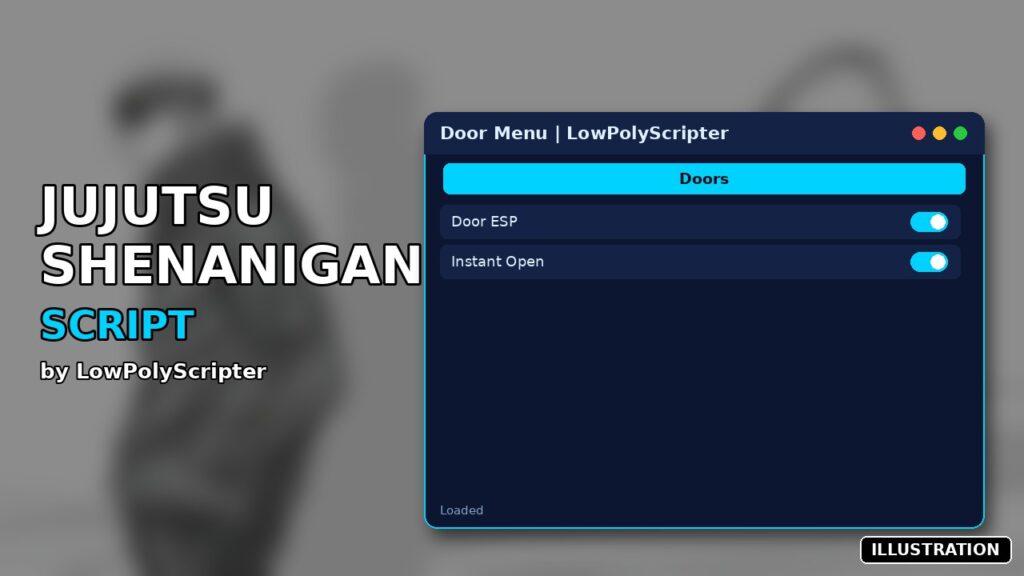
Door Menu is a Jujutsu Shenanigans script you can run in Delta on Android, iOS or PC. It includes door esp, instant open and more. It is a small Halloween event helper. Created by LowPolyScripter. No key.
Key Features
- Halloween Door ESP
- Instant Interact with doors (tap E)
This isn’t a combat script. The Door Menu Jujutsu Shenanigans helper from LowPolyScripter ignores M1 combos, skills and awakenings and only helps with the Halloween event: finding doors fast and getting through them without the hold-to-open wait.
The two switches
ESP Enabled outlines every door it finds and adds a floating label. Regular doors glow yellow and Halloween doors glow orange, so event doors stand out even across the map. Instant Open (Tap E) sets the hold time on door prompts to zero and stretches their reach to 15 studs, so a single tap opens them.
How to use it
- Copy the full code from the box (around 360 lines, no loadstring, no key) and run it in Delta. Codex should handle it as well, and so should Fluxus or Arceus X. PC tools are on the tested list too.
- Nothing pops up straight away. A small 🚪 orb appears on screen, and the console prints “Loaded — click 🚪 to open.”
- Tap the orb to open the “Door Menu” panel, then flip the switches you want under SETTINGS.
- Done for the day? Run
_G.DoorESP_Destroy()to remove the menu and highlights.
Jujutsu Shenanigans questions
Does it work after Halloween? It searches for objects named “door” and “halloweendoor”. Once the event’s doors are taken out of the game, the orange highlights simply won’t show.
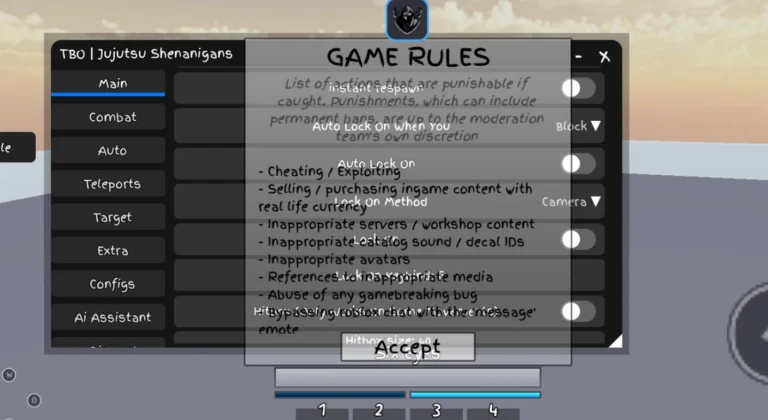
Is there a full JJS hub here? The game page also has TBO Hub, which is the option for fighting features.
Is it safe on mobile? The orb and panel are tap-friendly, and the page is marked mobile-friendly.
Event tip: keep Instant Open off while you’re in a fight near a door. You can’t open one by accident with a hold anymore, and a stray tap of E mid-combo could pull you through it.
--============================================================
-- DOOR ESP + INSTANT PROMPT — Clean GUI
-- LocalScript — StarterPlayer > StarterPlayerScripts
--============================================================
local Players = game:GetService("Players")
local RunService = game:GetService("RunService")
local ProximityPromptService = game:GetService("ProximityPromptService")
local LocalPlayer = Players.LocalPlayer
local Camera = workspace.CurrentCamera
------------------------------------------------------------
-- CONFIG
------------------------------------------------------------
local Config = {
ESP = {
Enabled = true,
ShowDistance = true,
ShowName = true,
},
Colors = {
["door"] = Color3.fromRGB(255, 200, 80), -- yellow
["halloweendoor"] = Color3.fromRGB(255, 120, 40), -- orange
},
MaxDistance = 5000,
InstantPrompt = true, -- Toggle for skipping the hold duration
}
------------------------------------------------------------
-- ROOT GUI
------------------------------------------------------------
local ScreenGui = Instance.new("ScreenGui")
ScreenGui.Name = "DoorESP"
ScreenGui.ResetOnSpawn = false
ScreenGui.IgnoreGuiInset = true
ScreenGui.DisplayOrder = 2147483647
ScreenGui.Parent = LocalPlayer:WaitForChild("PlayerGui")
------------------------------------------------------------
-- HELPERS
------------------------------------------------------------
local function getColor(name)
return Config.Colors[name:lower()]
end
local function getRoot(inst)
if inst:IsA("BasePart") then return inst end
if inst:IsA("Model") then
return inst.PrimaryPart
or inst:FindFirstChild("HumanoidRootPart")
or inst:FindFirstChild("Head")
or inst:FindFirstChildWhichIsA("BasePart")
end
return nil
end
------------------------------------------------------------
-- INSTANT INTERACT (HOLD BYPASS)
------------------------------------------------------------
-- This watches every prompt the game renders. If it belongs to
-- a door, we force its HoldDuration to 0 so it fires instantly.
local function checkPrompt(prompt)
if not Config.InstantPrompt then return end
if not prompt or not prompt.Parent then return end
-- Find if this prompt is inside a door
local parentModel = prompt:FindFirstAncestorOfClass("Model")
local targetName = parentModel and parentModel.Name or prompt.Parent.Name
if Config.Colors[targetName:lower()] then
pcall(function()
prompt.HoldDuration = 0
prompt.MaxActivationDistance = 15 -- Ensure it's reachable
end)
end
end
-- Hook existing prompts immediately
for _, obj in ipairs(workspace:GetDescendants()) do
if obj:IsA("ProximityPrompt") then
checkPrompt(obj)
end
end
-- Hook new prompts as they spawn
workspace.DescendantAdded:Connect(function(obj)
if obj:IsA("ProximityPrompt") then
task.defer(checkPrompt, obj)
end
end)
-- Also catch prompts the moment they appear on your screen
ProximityPromptService.PromptShown:Connect(function(prompt)
checkPrompt(prompt)
end)
------------------------------------------------------------
-- ESP TRACKER
------------------------------------------------------------
local tracked = {}
local function addESP(inst)
if tracked[inst] then return end
local color = getColor(inst.Name)
if not color then return end
if not (inst:IsA("Model") or inst:IsA("BasePart")) then return end
local ok = pcall(function()
local hl = Instance.new("Highlight")
hl.FillColor = color
hl.FillTransparency = 0.55
hl.OutlineColor = color
hl.OutlineTransparency = 0
hl.DepthMode = Enum.HighlightDepthMode.AlwaysOnTop
hl.Adornee = inst
hl.Parent = inst
local adornee = getRoot(inst) or inst
local bb = Instance.new("BillboardGui")
bb.Size = UDim2.new(0, 220, 0, 30)
bb.StudsOffsetWorldSpace = Vector3.new(0, 2.5, 0)
bb.AlwaysOnTop = true
bb.MaxDistance = Config.MaxDistance
bb.Adornee = adornee
local label = Instance.new("TextLabel")
label.Size = UDim2.new(1, 0, 1, 0)
label.BackgroundTransparency = 1
label.TextColor3 = color
label.Font = Enum.Font.GothamBold
label.TextSize = 14
label.TextStrokeTransparency = 0.4
label.Text = ""
label.Parent = bb
bb.Parent = inst
tracked[inst] = { hl = hl, bb = bb, label = label, root = adornee }
end)
if not ok then tracked[inst] = nil end
end
local function removeESP(inst)
local d = tracked[inst]
if not d then return end
pcall(function() d.hl:Destroy() end)
pcall(function() d.bb:Destroy() end)
tracked[inst] = nil
end
------------------------------------------------------------
-- SCAN
------------------------------------------------------------
local function scan(container, depth)
depth = depth or 0
if depth > 5 then return end
for _, obj in ipairs(container:GetChildren()) do
if obj:IsA("Folder") or obj:IsA("Configuration") then
scan(obj, depth + 1)
elseif Config.Colors[obj.Name:lower()] and not tracked[obj] then
if obj:IsA("Model") or obj:IsA("BasePart") then
addESP(obj)
end
end
end
end
scan(workspace)
workspace.DescendantAdded:Connect(function(obj)
if Config.Colors[obj.Name:lower()] and not tracked[obj] then
if obj:IsA("Model") or obj:IsA("BasePart") then
addESP(obj)
end
end
end)
workspace.DescendantRemoving:Connect(function(obj)
if tracked[obj] then removeESP(obj) end
end)
------------------------------------------------------------
-- ESP LABEL UPDATE
------------------------------------------------------------
RunService.RenderStepped:Connect(function()
if not Config.ESP.Enabled then
for _, d in pairs(tracked) do
if d.hl then d.hl.Enabled = false end
if d.bb then d.bb.Enabled = false end
end
return
end
local camPos = Camera.CFrame.Position
for inst, d in pairs(tracked) do
if not inst.Parent then
removeESP(inst)
else
local root = d.root
if not root or not root.Parent then
root = getRoot(inst)
d.root = root
end
if root then
d.hl.Enabled = true
d.bb.Enabled = true
local parts = {}
if Config.ESP.ShowName then parts[#parts + 1] = inst.Name end
if Config.ESP.ShowDistance then
local dist = (camPos - root.Position).Magnitude
parts[#parts + 1] = string.format("%dm", math.floor(dist))
end
d.label.Text = table.concat(parts, " ")
end
end
end
end)
------------------------------------------------------------
-- GUI BUILD
------------------------------------------------------------
local Orb = Instance.new("TextButton")
Orb.Size = UDim2.new(0, 50, 0, 50)
Orb.Position = UDim2.new(0, 20, 0.5, -25)
Orb.BackgroundColor3 = Color3.fromRGB(200, 100, 30)
Orb.Text = "🚪"
Orb.TextColor3 = Color3.fromRGB(255, 255, 255)
Orb.Font = Enum.Font.GothamBold
Orb.TextSize = 22
Orb.BorderSizePixel = 0
Orb.Parent = ScreenGui
Instance.new("UICorner", Orb).CornerRadius = UDim.new(1, 0)
local obs = Instance.new("UIStroke", Orb)
obs.Color = Color3.fromRGB(255, 180, 80); obs.Thickness = 2
local Main = Instance.new("Frame")
Main.Size = UDim2.new(0, 300, 0, 400)
Main.Position = UDim2.new(0.5, -150, 0.5, -200)
Main.BackgroundColor3 = Color3.fromRGB(18, 18, 22)
Main.BorderSizePixel = 0
Main.Active = true
Main.Draggable = true
Main.Visible = false
Main.Parent = ScreenGui
Instance.new("UICorner", Main).CornerRadius = UDim.new(0, 12)
local ms = Instance.new("UIStroke", Main)
ms.Color = Color3.fromRGB(70, 50, 40); ms.Thickness = 1
Orb.MouseButton1Click:Connect(function() Main.Visible = not Main.Visible end)
local Header = Instance.new("Frame")
Header.Size = UDim2.new(1, 0, 0, 40)
Header.BackgroundColor3 = Color3.fromRGB(28, 24, 22)
Header.BorderSizePixel = 0
Header.Parent = Main
Instance.new("UICorner", Header).CornerRadius = UDim.new(0, 12)
local hf = Instance.new("Frame")
hf.Size = UDim2.new(1, 0, 0, 12); hf.Position = UDim2.new(0, 0, 1, -12)
hf.BackgroundColor3 = Header.BackgroundColor3; hf.BorderSizePixel = 0
hf.Parent = Header
local Title = Instance.new("TextLabel")
Title.Size = UDim2.new(1, -46, 1, 0); Title.Position = UDim2.new(0, 16, 0, 0)
Title.BackgroundTransparency = 1
Title.Text = "🚪 Door Menu"
Title.TextColor3 = Color3.fromRGB(240, 230, 235)
Title.Font = Enum.Font.GothamBold; Title.TextSize = 14
Title.TextXAlignment = Enum.TextXAlignment.Left
Title.Parent = Header
local CloseBtn = Instance.new("TextButton")
CloseBtn.Size = UDim2.new(0, 24, 0, 24)
CloseBtn.Position = UDim2.new(1, -32, 0.5, -12)
CloseBtn.BackgroundColor3 = Color3.fromRGB(50, 40, 45)
CloseBtn.Text = "–"; CloseBtn.TextColor3 = Color3.fromRGB(220, 220, 230)
CloseBtn.Font = Enum.Font.GothamBold; CloseBtn.TextSize = 16
CloseBtn.BorderSizePixel = 0; CloseBtn.Parent = Header
Instance.new("UICorner", CloseBtn).CornerRadius = UDim.new(1, 0)
CloseBtn.MouseButton1Click:Connect(function() Main.Visible = false end)
local Content = Instance.new("ScrollingFrame")
Content.Size = UDim2.new(1, -16, 1, -50)
Content.Position = UDim2.new(0, 8, 0, 46)
Content.BackgroundTransparency = 1
Content.BorderSizePixel = 0
Content.ScrollBarThickness = 3
Content.ScrollBarImageColor3 = Color3.fromRGB(90, 50, 60)
Content.CanvasSize = UDim2.new(0, 0, 0, 0)
Content.AutomaticCanvasSize = Enum.AutomaticSize.Y
Content.Parent = Main
Instance.new("UIListLayout", Content).Padding = UDim.new(0, 6)
local function section(text)
local h = Instance.new("Frame")
h.Size = UDim2.new(1, -8, 0, 20)
h.BackgroundTransparency = 1; h.Parent = Content
local l = Instance.new("TextLabel")
l.Size = UDim2.new(1, 0, 1, 0)
l.BackgroundTransparency = 1; l.Text = text
l.TextColor3 = Color3.fromRGB(150, 130, 140)
l.Font = Enum.Font.GothamBold; l.TextSize = 11
l.TextXAlignment = Enum.TextXAlignment.Left
l.Parent = h
end
local function toggle(name, getState, setState, accent)
local btn = Instance.new("TextButton")
btn.Size = UDim2.new(1, -8, 0, 30)
btn.BackgroundColor3 = Color3.fromRGB(34, 30, 38)
btn.BorderSizePixel = 0; btn.Text = ""; btn.Parent = Content
Instance.new("UICorner", btn).CornerRadius = UDim.new(0, 6)
local lbl = Instance.new("TextLabel")
lbl.Size = UDim2.new(1, -56, 1, 0); lbl.Position = UDim2.new(0, 12, 0, 0)
lbl.BackgroundTransparency = 1; lbl.Text = name
lbl.TextColor3 = Color3.fromRGB(220, 218, 225)
lbl.Font = Enum.Font.Gotham; lbl.TextSize = 13
lbl.TextXAlignment = Enum.TextXAlignment.Left
lbl.Parent = btn
local ind = Instance.new("Frame")
ind.Size = UDim2.new(0, 36, 0, 18)
ind.Position = UDim2.new(1, -46, 0.5, -9)
ind.BackgroundColor3 = Color3.fromRGB(58, 52, 60)
ind.BorderSizePixel = 0; ind.Parent = btn
Instance.new("UICorner", ind).CornerRadius = UDim.new(1, 0)
local dot = Instance.new("Frame")
dot.Size = UDim2.new(0, 14, 0, 14)
dot.Position = UDim2.new(0, 2, 0.5, -7)
dot.BackgroundColor3 = Color3.fromRGB(210, 205, 210)
dot.BorderSizePixel = 0; dot.Parent = ind
Instance.new("UICorner", dot).CornerRadius = UDim.new(1, 0)
local function refresh()
if getState() then
ind.BackgroundColor3 = accent or Color3.fromRGB(200, 60, 70)
dot.Position = UDim2.new(1, -16, 0.5, -7)
else
ind.BackgroundColor3 = Color3.fromRGB(58, 52, 60)
dot.Position = UDim2.new(0, 2, 0.5, -7)
end
end
btn.MouseButton1Click:Connect(function() setState(not getState()); refresh() end)
refresh()
end
-- ===== SETTINGS =====
section("SETTINGS")
toggle("ESP Enabled", function() return Config.ESP.Enabled end, function(v) Config.ESP.Enabled = v end)
toggle("Instant Open (Tap E)", function() return Config.InstantPrompt end, function(v)
Config.InstantPrompt = v
-- Apply instantly to all currently loaded prompts
for _, obj in ipairs(workspace:GetDescendants()) do
if obj:IsA("ProximityPrompt") then checkPrompt(obj) end
end
end, Color3.fromRGB(80, 200, 120))
------------------------------------------------------------
-- EXPOSE DESTROY HOOK
------------------------------------------------------------
_G.DoorESP_Destroy = function()
for inst in pairs(tracked) do removeESP(inst) end
pcall(function() ScreenGui:Destroy() end)
_G.DoorESP_Destroyed = true
print("[Door Menu] Destroyed.")
end
print("[Door Menu] Loaded — click 🚪 to open.") Game page[BLACK DEATH] Jujutsu Shenanigans · 2 scripts on this siteRoblox ›