 26 6 No Key
Mushrooming Script [No Key] | YourBae (Auto Farm, Auto Cut)
Mushrooming · RobloxDescription
Want the best Roblox script for Mushrooming 🍄 [ROOTWAYS]? YourBae offers a script with amazing features like Filter Rarity, Auto Cut, Auto Wash, Auto Farm, Set Wash Spot and more. It runs on any executor and is simple to set up in minutes.
Key Features
- Auto Cut
- Filter Rarity
- Set Merchant
- Auto Wash
- Auto Farm
- Input Latency
- Auto Sell
- Set Wash Spot
- Anti AFK
- Auto Walk
Mushrooming (the ROOTWAYS update) sends you into Whisperwood to pick 84 kinds of mushroom, chasing rare ones and the PERFECT CUT that pays out the most. Rain, fog and night bring the rarest finds. YourBae’s script is a small, readable farm bot for exactly that: it walks to mushrooms, cuts them, washes them and sells the haul, with no key in the way.
The YourBae panel at a glance
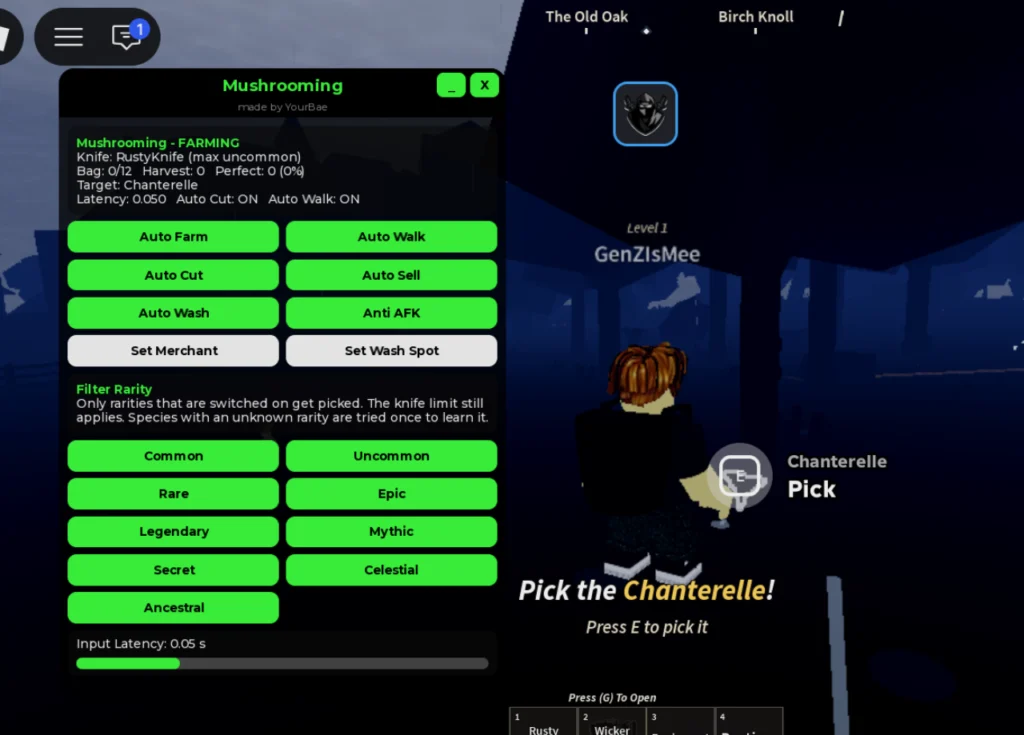
The green-on-black window titled “Mushrooming, made by YourBae” opens with a live status block. In the screenshot it reads FARMING with a RustyKnife (max uncommon), Bag 0/12, harvest and Perfect counters, the current target (a Chanterelle) and the input latency. Below that are eight buttons:
- Auto Farm and Auto Walk: find a mushroom and path to it.
- Auto Cut: handles the cut once you reach it, with Perfect hits counted in the status line.
- Auto Wash plus Set Wash Spot: picks the wash station the bot uses.
- Auto Sell plus Set Merchant: picks which merchant gets the bag.
- Anti AFK: keeps long sessions alive.
Filter Rarity sits underneath with nine toggles from Common through Uncommon, Rare, Epic, Legendary, Mythic, Secret and Celestial up to Ancestral. Only switched-on rarities get picked, and a species the script hasn’t seen yet is tried once so it can learn its rarity. An Input Latency slider (0.05 s by default) finishes the panel.
How to start it
Load into Whisperwood, paste the loadstring into Delta, or Wave, Codex, Trigon Evo, ArceusX or KRNL if you use one of those, and run it. The GitHub file is plain Lua rather than an obfuscated blob, and it makes no web requests of its own. It does write two things to your executor’s workspace folder: a Mushrooming/Mushrooming.json file holding your settings, and autofarm_log.txt with a timestamped log of what the bot did. Running it a second time stops the old farm before the new one starts, which keeps a pair of bots from racing each other to one mushroom.
Mushrooming script FAQ
Is it keyless? Yes, the page marks it no key and the file opens the menu straight away.
Why won’t it pick my Legendary mushrooms? The rarity filter can’t override your knife. The panel says the knife limit still applies, so a RustyKnife stops at uncommon whatever you toggle.
Can I use it on mobile? It’s listed as mobile friendly.
Foraging tip
Since weather drives the rare spawns, leave the higher rarities switched on through rain, fog and night once your knife can handle them, and turn off Common so the 12-slot bag isn’t filled with cheap picks.
loadstring(game:HttpGet('https://raw.githubusercontent.com/xmagisk00/Coin-Pusher/refs/heads/main/Helper%20Mushrooming.lua'))() Game pageMushrooming · 1 script on this siteRoblox ›