
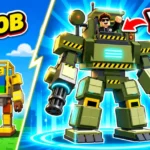
Build A Mech! Scripts
S0ftKillz's Build A Mech! script hauls scrap for you with Auto Farm, Auto Deposit and Only Return When Full, then puts you in a mech and spends on upgrades. 21 options, key needed.
1Scripts
45Views
10Copies
0%Working votes
 456 days ago Key
About Build A Mech! scripts
Build A Mech! starts you as a rusty scrap bot. You pull parts out of 10 arenas, carry them home, assemble up to 30 mechs and pilot each one on the way to a giant Titan.
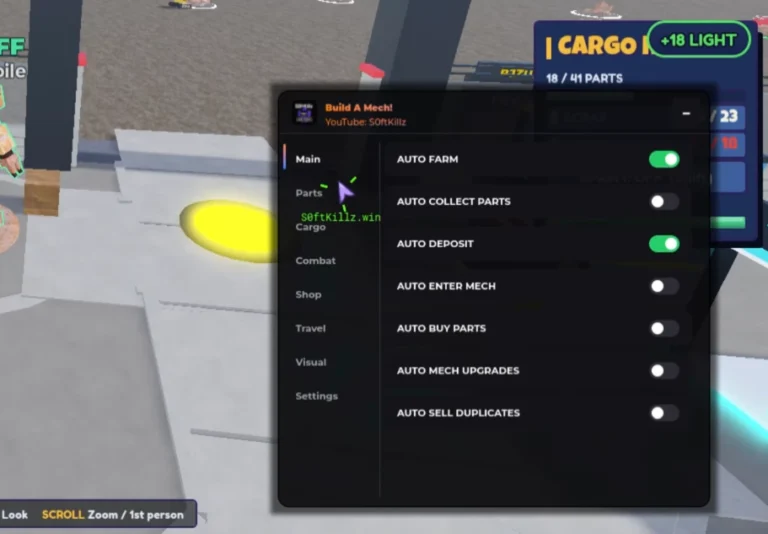
S0ftKillz loads a large Pastebin file he shares across many of his hubs, and the right game menu is built once it starts. After the key prompt, a dark "Build A Mech!" panel opens with eight tabs: Main, Parts, Cargo, Combat, Shop, Travel, Visual and Settings. Most of the 21 options attack the slow part, carrying scrap: Auto Farm, Auto Collect Parts, Auto Deposit and Deliver To Base, with Only Return When Full so you don't walk back half empty. Auto Enter Mech and Enter Nearest Owned Mech get you into the cockpit, Auto Mech Upgrades spends your cash, and Auto Mob Farm, Attack Nearest Mob and Auto Swing deal with arena enemies. Part Pile ESP, Mech ESP, Fullbright and Auto Save Config round it off.
Which one to pick
- S0ftKillz (key): best if hauling parts is what wears you out; turn on Only Return When Full early so each trip home is worth it.
FAQ
Does it run on phones?
Yes, it's listed for mobile, with KRNL, Codex, Wave, ArceusX and Trigon Evo ticked next to Delta.
Can it fight the arena mobs?
Auto Mob Farm, Attack Nearest Mob and Auto Swing are on the Combat side for that.
Will my settings stick between sessions?
Auto Save Config and Auto Load Config are in the housekeeping options, so you can set it up once.
More trending games
All games →#1 Steal an Egg45 scripts · 423.6K views#2
 Blox Fruits9 scripts · 105.7K views#3
 Roblox Universal76 scripts · 54.7K views#4
 99 Nights in the Forest2 scripts · 34.6K views#5
 Ride A Pet6 scripts · 17.2K views#6
 [🏖️] MM2 Aim Trainer 21 script · 10.9K views#7
 [X2] +1 Speed Keyboard Escape | Candy & Chocolate2 scripts · 10.4K views#8
 DOORS 👁️1 script · 8.8K views#9
 Break and Steal an Egg3 scripts · 7.3K views
Steal an Egg45 scripts · 423.6K views#2Blox Fruits9 scripts · 105.7K views#3Roblox Universal76 scripts · 54.7K views#499 Nights in the Forest2 scripts · 34.6K views#5Ride A Pet6 scripts · 17.2K views#6[🏖️] MM2 Aim Trainer 21 script · 10.9K views#7[X2] +1 Speed Keyboard Escape | Candy & Chocolate2 scripts · 10.4K views#8DOORS 👁️1 script · 8.8K views#9Break and Steal an Egg3 scripts · 7.3K views