 15 8 No Key
Curtain Call Script (Delta Mobile) – CC Menu: Speed Hack, ESP
Curtain Call · RobloxDescription
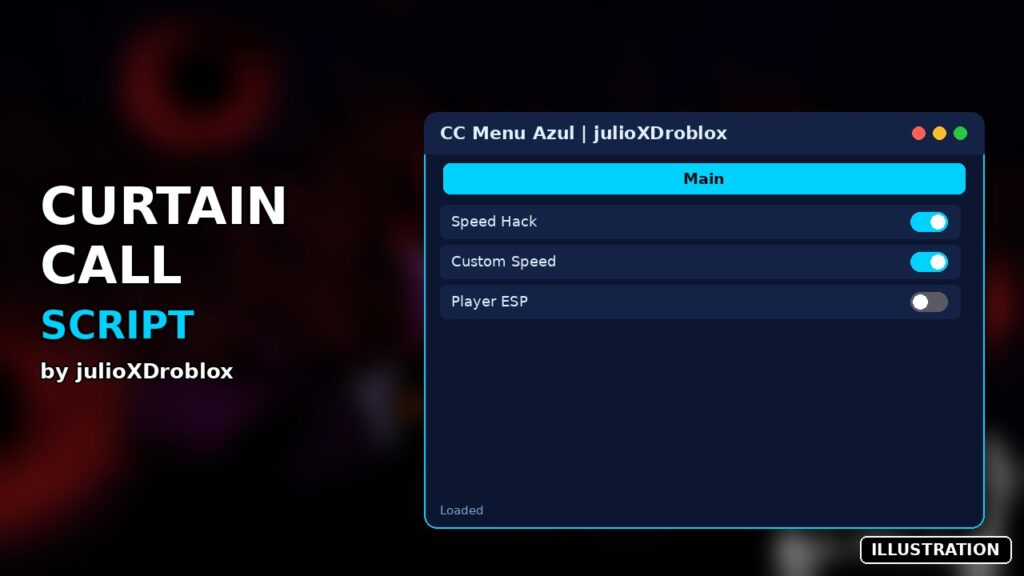
CC Menu Azul is a Curtain Call script you can run in Delta on Android, iOS or PC. It includes speed hack, custom speed, player esp and more. It is a small blue menu with two buttons. Created by julioXDroblox. No key.
Key Features
- Speed hack (on/off) with a custom speed box
- Player ESP highlight
Curtain Call is a 1v8 horror game in the style of Dead by Daylight. The Production Crew finishes tasks to set the stage while the Star of the Show hunts them down, and everyone needs to escape before showtime. CC Menu Azul by julioXDroblox is about as minimal as a Curtain Call script gets: a single dark window with two features, faster movement and a highlight you can see through walls.
The two buttons
- Speed (OFF / ON)
- When it’s on, the button turns from red to green, and every frame your WalkSpeed is set to the number in the box underneath. The box starts at 45. Normal Roblox walking speed is 16. Type a new value and tap outside the box to apply it. Anything that isn’t a number is rejected, and the box goes back to the previous value.
- ESP Azul (OFF / ON)
- Every other player gets a blue fill with a white outline that shows through walls. It refreshes once a second, so players who respawn or join late get highlighted too.
Running and closing it
The whole script is in the code box, a bit under 180 lines. It has no loadstring and makes no web requests, so there’s no key and nothing to download. Copy all of it into Delta and execute once you’ve spawned. The window appears on the left side of the screen and you can drag it. The square button at the top hides it and leaves an “Abrir Menu” button (“open menu” in Spanish) at the top of the screen to bring it back. The X turns everything off: your speed goes back to 16, the highlights disappear and the window closes. If you run the script again, it replaces the old copy.
All it does is build a window and change your walk speed, so it doesn’t need anything unusual from your executor. The listing pairs Delta with Arceus X and Codex, then Fluxus and computer executors.
Questions players ask
Does the ESP show who the Star is? No. Crew and Star get the same blue, so you have to tell them apart by their character model.
Is 45 too fast? It’s almost three times normal walking speed, and servers only hold nine people, so other players will notice. Lower the number if you don’t want to stand out.
Crew tip: keep ESP Azul on while you do tasks so you can watch where the Star is, and only turn Speed on when you’re being chased. Sprinting at 45 between tasks makes you very easy to spot.
local Players = game:GetService("Players")
local LocalPlayer = Players.LocalPlayer
local RunService = game:GetService("RunService")
local CoreGui = game:GetService("CoreGui")
if CoreGui:FindFirstChild("MenuCurtainCallFinalAzul") then CoreGui.MenuCurtainCallFinalAzul:Destroy() end
local sg = Instance.new("ScreenGui", CoreGui)
sg.Name = "MenuCurtainCallFinalAzul"
local MainFrame = Instance.new("Frame", sg)
MainFrame.Size = UDim2.new(0, 200, 0, 220)
MainFrame.Position = UDim2.new(0.05, 0, 0.25, 0)
MainFrame.BackgroundColor3 = Color3.fromRGB(25, 25, 25)
MainFrame.Active = true
MainFrame.Draggable = true
local title = Instance.new("TextLabel", MainFrame)
title.Size = UDim2.new(0.6, 0, 0, 35)
title.Text = " CC MENU AZUL"
title.TextColor3 = Color3.fromRGB(255, 255, 255)
title.BackgroundColor3 = Color3.fromRGB(15, 15, 15)
title.Font = Enum.Font.SourceSansBold
title.TextSize = 14
title.TextXAlignment = Enum.TextXAlignment.Left
local ReopenBtn = Instance.new("TextButton", sg)
ReopenBtn.Size = UDim2.new(0, 100, 0, 30)
ReopenBtn.Position = UDim2.new(0.5, -50, 0.02, 0)
ReopenBtn.Text = "Abrir Menu"
ReopenBtn.BackgroundColor3 = Color3.fromRGB(35, 35, 35)
ReopenBtn.TextColor3 = Color3.fromRGB(255, 255, 255)
ReopenBtn.Font = Enum.Font.SourceSansBold
ReopenBtn.TextSize = 14
ReopenBtn.Visible = false
local MinimizeBtn = Instance.new("TextButton", MainFrame)
MinimizeBtn.Size = UDim2.new(0.2, 0, 0, 35)
MinimizeBtn.Position = UDim2.new(0.6, 0, 0, 0)
MinimizeBtn.Text = "🔲"
MinimizeBtn.TextColor3 = Color3.fromRGB(200, 200, 200)
MinimizeBtn.BackgroundColor3 = Color3.fromRGB(35, 35, 35)
MinimizeBtn.Font = Enum.Font.SourceSansBold
MinimizeBtn.TextSize = 12
MinimizeBtn.MouseButton1Click:Connect(function()
MainFrame.Visible = false
ReopenBtn.Visible = true
end)
ReopenBtn.MouseButton1Click:Connect(function()
MainFrame.Visible = true
ReopenBtn.Visible = false
end)
_G.SpeedHackActive = false
_G.TargetSpeed = 45
local espActive = false
local function limpiarTodoESP()
for _, p in pairs(Players:GetPlayers()) do
if p.Character and p.Character:FindFirstChild("EspFinalAzul") then
p.Character.EspFinalAzul:Destroy()
end
end
end
local CloseBtn = Instance.new("TextButton", MainFrame)
CloseBtn.Size = UDim2.new(0.2, 0, 0, 35)
CloseBtn.Position = UDim2.new(0.8, 0, 0, 0)
CloseBtn.Text = "X"
CloseBtn.TextColor3 = Color3.fromRGB(255, 100, 100)
CloseBtn.BackgroundColor3 = Color3.fromRGB(20, 10, 10)
CloseBtn.Font = Enum.Font.SourceSansBold
CloseBtn.TextSize = 16
CloseBtn.MouseButton1Click:Connect(function()
_G.SpeedHackActive = false
espActive = false
pcall(function() LocalPlayer.Character.Humanoid.WalkSpeed = 16 end)
limpiarTodoESP()
sg:Destroy()
end)
local bSpeed = Instance.new("TextButton", MainFrame)
bSpeed.Size = UDim2.new(0.9, 0, 0, 35)
bSpeed.Position = UDim2.new(0.05, 0, 0.20, 0)
bSpeed.Text = "Speed (OFF)"
bSpeed.BackgroundColor3 = Color3.fromRGB(150, 40, 40)
bSpeed.TextColor3 = Color3.fromRGB(255, 255, 255)
bSpeed.Font = Enum.Font.SourceSansBold
bSpeed.MouseButton1Click:Connect(function()
_G.SpeedHackActive = not _G.SpeedHackActive
if _G.SpeedHackActive then
bSpeed.Text = "Speed (ON)"
bSpeed.BackgroundColor3 = Color3.fromRGB(40, 150, 40)
else
bSpeed.Text = "Speed (OFF)"
bSpeed.BackgroundColor3 = Color3.fromRGB(150, 40, 40)
pcall(function() LocalPlayer.Character.Humanoid.WalkSpeed = 16 end)
end
end)
task.spawn(function()
while true do
task.wait()
if _G.SpeedHackActive then
pcall(function()
local character = LocalPlayer.Character
if character and character:FindFirstChild("Humanoid") then
character.Humanoid.WalkSpeed = _G.TargetSpeed
end
end)
end
end
end)
local speedInput = Instance.new("TextBox", MainFrame)
speedInput.Size = UDim2.new(0.9, 0, 0, 30)
speedInput.Position = UDim2.new(0.05, 0, 0.42, 0)
speedInput.Text = tostring(_G.TargetSpeed)
speedInput.BackgroundColor3 = Color3.fromRGB(40, 40, 40)
speedInput.TextColor3 = Color3.fromRGB(255, 255, 255)
speedInput.Font = Enum.Font.SourceSans
speedInput.TextSize = 14
speedInput.FocusLost:Connect(function()
local num = tonumber(speedInput.Text)
if num then _G.TargetSpeed = num else speedInput.Text = tostring(_G.TargetSpeed) end
end)
local bEsp = Instance.new("TextButton", MainFrame)
bEsp.Size = UDim2.new(0.9, 0, 0, 35)
bEsp.Position = UDim2.new(0.05, 0, 0.68, 0)
bEsp.Text = "ESP Azul (OFF)"
bEsp.BackgroundColor3 = Color3.fromRGB(150, 40, 40)
bEsp.TextColor3 = Color3.fromRGB(255, 255, 255)
bEsp.Font = Enum.Font.SourceSansBold
local function applyAzulESP(p)
if p ~= LocalPlayer and p.Character then
if p.Character:FindFirstChild("EspFinalAzul") then p.Character.EspFinalAzul:Destroy() end
local hl = Instance.new("Highlight")
hl.Name = "EspFinalAzul"
hl.DepthMode = Enum.HighlightDepthMode.AlwaysOnTop
hl.FillColor = Color3.fromRGB(0, 102, 255)
hl.FillTransparency = 0.40
hl.OutlineColor = Color3.fromRGB(255, 255, 255)
hl.OutlineTransparency = 0
hl.Adornee = p.Character
hl.Parent = p.Character
end
end
bEsp.MouseButton1Click:Connect(function()
espActive = not espActive
if espActive then
bEsp.Text = "ESP Azul (ON)"
bEsp.BackgroundColor3 = Color3.fromRGB(40, 150, 40)
task.spawn(function()
while espActive do
for _, p in pairs(Players:GetPlayers()) do
applyAzulESP(p)
end
task.wait(1)
end
end)
else
bEsp.Text = "ESP Azul (OFF)"
bEsp.BackgroundColor3 = Color3.fromRGB(150, 40, 40)
limpiarTodoESP()
end
end) Game pageCurtain Call · 1 script on this siteRoblox ›