 13 8 No Key
Destruction Simulator Script (Delta Mobile) – Love Hub: Coins, Levels
Destruction Simulator · RobloxDescription
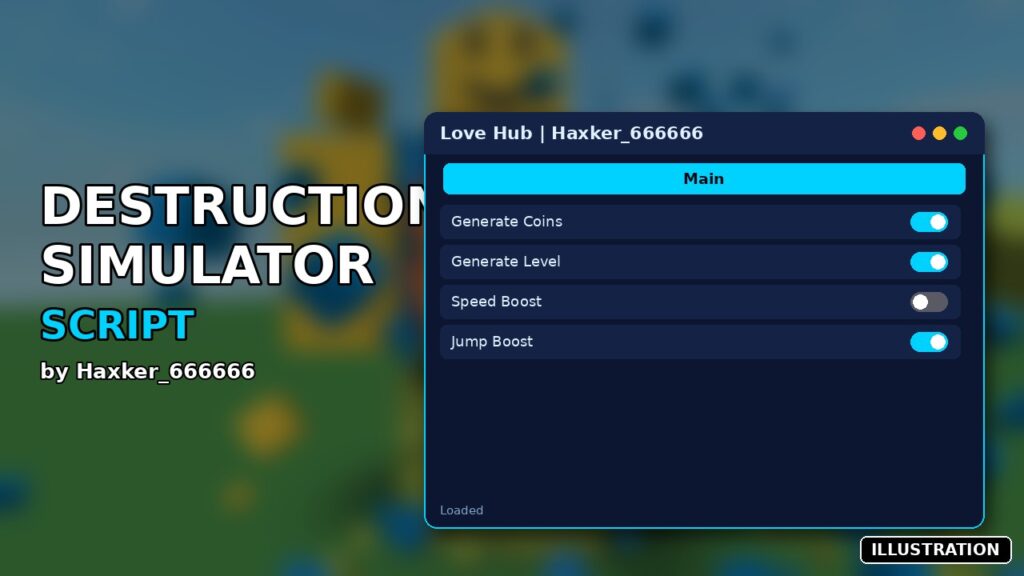
Love Hub is a Destruction Simulator script you can run in Delta on Android, iOS or PC. It includes generate coins, generate level, speed boost and more. It is a small v2.2 menu with four buttons. Created by Haxker_666666. No key.
Key Features
- Generate Coins
- Generate Level
- Speed boost (50)
- Jump boost (100)
Love Hub is about as short as a Destruction Simulator script gets: one small window, four buttons, and no tabs to dig through. Haxker_666666 aims it at the two things the game makes you grind for, coins and levels, and adds a couple of movement boosts on top.
Generate Coins calls the game’s generateBoost remote and asks for 9,999,999 coins in one go. Generate Level uses the same remote and requests 10 levels per press. Either way the server decides whether to honor the request, so check your counters after the first tap. If a button fails, the console shows “Failed to fire generateBoost”.
The other two are toggles. Speed sets your walk speed to 50 (16 when off) and Jump sets jump power to 100 (back to 50 when off). The button text flips between “Speed: 50” and “Speed: OFF” so you can see the state at a glance. The X in the corner closes the window.
How to load Love Hub
Copy the code box on this page. It’s the complete script (the comments are in Thai), with no loadstring, no key and no outside links. Join Destruction Simulator, paste it into Delta’s editor and execute. The window survives respawns because it’s built with ResetOnSpawn off. Delta is the primary pick, though the Tested With row also shows Fluxus, Codex and Arceus X, plus desktop executors.
Destruction Simulator FAQ
Is this the only script for the game here? For now, yes. Love Hub is the single Destruction Simulator listing.
Why is my game lagging? The developer warns that the explosions use heavy physics, and weaker devices can stutter. That’s the game, not the script.
Will the speed stay after I die? The boost is applied once to your current character, so tap the toggle off and on again after a respawn.
Demolition tip: press Generate Coins once and confirm the balance before spamming it. If the server accepted the request, go spend it on the rocket launchers and bombs. If it didn’t, the level button and the movement toggles are still worth keeping.
local Players = game:GetService("Players")
local ReplicatedStorage = game:GetService("ReplicatedStorage")
local UserInputService = game:GetService("UserInputService")
local player = Players.LocalPlayer
local playerGui = player:WaitForChild("PlayerGui")
-- 1. สร้าง ScreenGui หลัก
local screenGui = Instance.new("ScreenGui")
screenGui.Name = "LoveHubGui"
screenGui.ResetOnSpawn = false
screenGui.Parent = playerGui
-- 2. สร้างกรอบหน้าต่าง (Frame)
local frame = Instance.new("Frame")
frame.Size = UDim2.new(0, 250, 0, 245)
frame.Position = UDim2.new(0.5, -125, 0.5, -122)
frame.BackgroundColor3 = Color3.fromRGB(45, 45, 45)
frame.BorderSizePixel = 0
frame.Parent = screenGui
-- 3. แถบหัวข้อ Hub (ใช้สำหรับกดคลิกค้างเพื่อลาก)
local titleBar = Instance.new("TextLabel")
titleBar.Size = UDim2.new(1, 0, 0, 35)
titleBar.BackgroundColor3 = Color3.fromRGB(25, 25, 25)
titleBar.TextColor3 = Color3.fromRGB(255, 255, 255)
titleBar.Text = "Love Hub"
titleBar.Font = Enum.Font.SourceSansBold
titleBar.TextSize = 18
titleBar.Parent = frame
-- ระบบลากหน้าต่าง (Dragging)
local dragging
local dragInput
local dragStart
local startPos
titleBar.InputBegan:Connect(function(input)
if input.UserInputType == Enum.UserInputType.MouseButton1 or input.UserInputType == Enum.UserInputType.Touch then
dragging = true
dragStart = input.Position
startPos = frame.Position
input.Changed:Connect(function()
if input.UserInputState == Enum.UserInputState.End then
dragging = false
end
end)
end
end)
titleBar.InputChanged:Connect(function(input)
if input.UserInputType == Enum.UserInputType.MouseMovement or input.UserInputType == Enum.UserInputType.Touch then
dragInput = input
end
end)
UserInputService.InputChanged:Connect(function(input)
if input == dragInput and dragging then
local delta = input.Position - dragStart
frame.Position = UDim2.new(
startPos.X.Scale,
startPos.X.Offset + delta.X,
startPos.Y.Scale,
startPos.Y.Offset + delta.Y
)
end
end)
-- ปุ่มปิด (X)
local closeBtn = Instance.new("TextButton")
closeBtn.Size = UDim2.new(0, 35, 0, 35)
closeBtn.Position = UDim2.new(1, -35, 0, 0)
closeBtn.BackgroundColor3 = Color3.fromRGB(200, 50, 50)
closeBtn.TextColor3 = Color3.fromRGB(255, 255, 255)
closeBtn.Text = "X"
closeBtn.Font = Enum.Font.SourceSansBold
closeBtn.TextSize = 16
closeBtn.Parent = titleBar
closeBtn.Activated:Connect(function()
screenGui:Destroy()
end)
-- 4. ปุ่ม Generate Coins[cite: 1]
local coinBtn = Instance.new("TextButton")
coinBtn.Size = UDim2.new(0.9, 0, 0, 40)
coinBtn.Position = UDim2.new(0.05, 0, 0, 45)
coinBtn.BackgroundColor3 = Color3.fromRGB(120, 120, 120)
coinBtn.TextColor3 = Color3.fromRGB(255, 255, 255)
coinBtn.Text = "Generate Coins"
coinBtn.Font = Enum.Font.SourceSansBold
coinBtn.TextSize = 16
coinBtn.Parent = frame
coinBtn.Activated:Connect(function()
local success, err = pcall(function()
ReplicatedStorage:WaitForChild("Remotes"):WaitForChild("generateBoost"):FireServer("Coins", 0, 9999999)
end)
if not success then
warn("Failed to fire generateBoost (Coins):", err)
end
end)
-- 5. ปุ่ม Max Level[cite: 1]
local levelBtn = Instance.new("TextButton")
levelBtn.Size = UDim2.new(0.9, 0, 0, 40)
levelBtn.Position = UDim2.new(0.05, 0, 0, 95)
levelBtn.BackgroundColor3 = Color3.fromRGB(120, 120, 120)
levelBtn.TextColor3 = Color3.fromRGB(255, 255, 255)
levelBtn.Text = " Generate Level"
levelBtn.Font = Enum.Font.SourceSansBold
levelBtn.TextSize = 16
levelBtn.Parent = frame
levelBtn.Activated:Connect(function()
local success, err = pcall(function()
ReplicatedStorage:WaitForChild("Remotes"):WaitForChild("generateBoost"):FireServer("Levels", 0, 10)
end)
if not success then
warn("Failed to fire generateBoost (Levels):", err)
end
end)
-- 6. ปุ่ม Speed (ความเร็ว 50)[cite: 1]
local speedState = false
local speedBtn = Instance.new("TextButton")
speedBtn.Size = UDim2.new(0.9, 0, 0, 40)
speedBtn.Position = UDim2.new(0.05, 0, 0, 145)
speedBtn.BackgroundColor3 = Color3.fromRGB(120, 120, 120)
speedBtn.TextColor3 = Color3.fromRGB(255, 255, 255)
speedBtn.Text = "Speed: OFF"
speedBtn.Font = Enum.Font.SourceSansBold
speedBtn.TextSize = 16
speedBtn.Parent = frame
speedBtn.Activated:Connect(function()
speedState = not speedState
speedBtn.Text = speedState and "Speed: 50" or "Speed: OFF"
local character = player.Character
if character then
local humanoid = character:FindFirstChildOfClass("Humanoid")
if humanoid then
humanoid.WalkSpeed = speedState and 50 or 16
end
end
end)
-- 7. ปุ่ม Jump (พลังกระโดด 100)[cite: 1]
local jumpState = false
local jumpBtn = Instance.new("TextButton")
jumpBtn.Size = UDim2.new(0.9, 0, 0, 40)
jumpBtn.Position = UDim2.new(0.05, 0, 0, 195)
jumpBtn.BackgroundColor3 = Color3.fromRGB(120, 120, 120)
jumpBtn.TextColor3 = Color3.fromRGB(255, 255, 255)
jumpBtn.Text = "Jump: OFF"
jumpBtn.Font = Enum.Font.SourceSansBold
jumpBtn.TextSize = 16
jumpBtn.Parent = frame
jumpBtn.Activated:Connect(function()
jumpState = not jumpState
jumpBtn.Text = jumpState and "Jump: 100" or "Jump: OFF"
local character = player.Character
if character then
local humanoid = character:FindFirstChildOfClass("Humanoid")
if humanoid then
humanoid.UseJumpPower = true
humanoid.JumpPower = jumpState and 100 or 50
end
end
end) Game pageDestruction Simulator · 1 script on this siteRoblox ›