 63 24 Requires Key
LINE UP! Metro Tycoon Script | Yuri | Auto Build, Auto Trains
LINE UP! Metro Tycoon · RobloxDescription
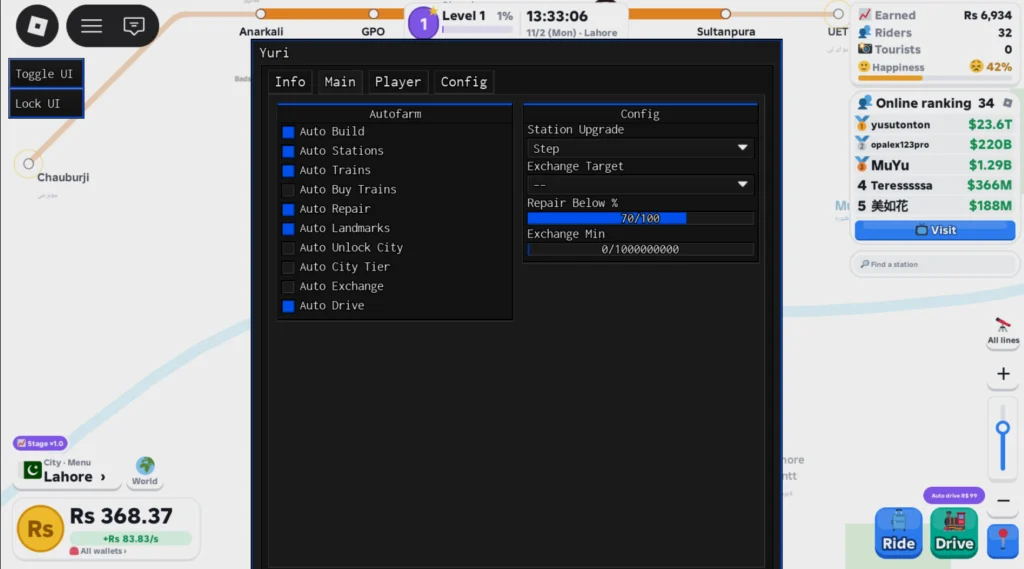
Yuri brings a powerful Roblox script for LINE UP! Metro Tycoon. Automate your gameplay with features like Auto Build, Auto Farm, Auto Buy Trains, Auto Landmarks, Auto Unlock City and Auto Drive etc, save time, and progress faster. Get the latest working version right here.
Key Features
- Auto City Tier
- Auto Stations
- Auto Build
- Auto Repair
- Auto Farm
- Auto Trains
- Auto Landmarks
- Auto Drive
- Auto Exchange
- Auto Buy Trains
- Auto Unlock City
- WalkSpeed
- TPWalk
- Noclip
- JumpPower
- Anti Knockback
- HipHeight
- Gravity
- Field of View
- Camera Zoom
- Set Max FPS
- Instant Prompt
- Fullbright
- Disable 3D Rendering
- No Fog
- FPS Boost
- Time Of Day
- Auto Reconnect
- Auto Jump
- Auto Execute
- Anti AFK
- No Gameplay Paused
Running a subway without lifting a finger
LINE UP! Metro Tycoon is about laying track, filling it with trains and growing from one small city into bigger ones. Yuri’s menu has eleven toggles aimed at that network, and below them sit the movement, display and anti idle switches Yuri bundles with every release.
| Network job | Toggle |
|---|---|
| Expanding the map | Auto Build, Auto Stations, Auto Landmarks |
| Rolling stock | Auto Buy Trains, Auto Trains, Auto Drive |
| Keeping lines open | Auto Repair |
| Money | Auto Farm, Auto Exchange |
| Growing the city | Auto City Tier, Auto Unlock City |
Auto Drive sits next to the purchase toggles for players who would rather not steer trains by hand, and Auto Repair is there for the repair side of running a line while you are away.
Launching it
- Open the metro game and let it finish loading. Yuri’s loader waits for that by itself, but executing in the lobby of a different place ends in a kick.
- Run the single loadstring. It is the same GitHub file Yuri uses for Steal and Cure a Zombie, Clean All the Leaves and other uploads, and it selects this game from its ID list.
- When the key panel pops up, press Linkvertise or Lootlabs to copy a Luarmor link, finish it in a browser and paste the result into the box (it has to be exactly 32 characters).
- Press Check Key. Your executor keeps the accepted key on disk, so the panel only comes back once it expires or turns invalid.
Successful tests are reported on Delta, ArceusX, Codex, KRNL, Trigon Evo and Wave, with a mobile tag on the listing.
Other switches in the window
A second block covers your character: WalkSpeed, TPWalk, JumpPower, Gravity, HipHeight, Noclip, Auto Jump and Anti Knockback. Graphics and performance get No Fog, Fullbright, Field of View, Time Of Day, Camera Zoom, Set Max FPS, FPS Boost and Disable 3D Rendering, plus Instant Prompt. To stay online you have Auto Execute, Anti AFK, No Gameplay Paused and Auto Reconnect.
FAQ
Can the script unlock new cities in LINE UP! Metro Tycoon?
Yes. Auto Unlock City opens them, and Auto City Tier deals with tier progress.
Does it buy trains by itself?
Auto Buy Trains handles purchases, while Auto Trains is a separate toggle in the list.
How many metro scripts are on Delta?
Only this one at the moment.
Tip: combine Disable 3D Rendering with Anti AFK when you leave the network to run overnight. Rendering a big map full of moving trains is hard on a phone.
loadstring(game:HttpGet("https://raw.githubusercontent.com/iLove-yuri/leeeeesbian/refs/heads/main/homumado.lua"))() Game pageLINE UP! Metro Tycoon · 1 script on this siteRoblox ›