 24 8 No Key
My Bus Script [No Key] | Bus Hub (Bus Boost, Overspeed Push)
My Bus 🚌 · RobloxDescription
Bus Hub brings a powerful Roblox script for My Bus 🚌 Game. Automate your gameplay with features like Overspeed Push, Brake Multiplier, Bus Boost and Speed Multiplier etc, save time, and progress faster. Get the latest working version right here.
Key Features
- Brake Multiplier (1-10x)
- Speed Multiplier (1-10x)
- Overspeed Push
- Boost Speed Cap
- Bus Boost
My Bus 🚌 puts you behind the wheel in the city of Greybridge: seven routes, passengers paying fares, a timetable to keep, and the occasional strange incident on the road. Bus Hub doesn’t drive for you. It’s a small tuning menu that makes whatever bus you’re sitting in faster and better at stopping.
No key, one line
There’s no key step. The loader pulls Bus Hub straight from a GitHub repository (NewTabGames/Bus-Hub), so you paste it into Delta, run it and the window appears. Its source is scrambled by an obfuscator, which hides the internals, though nothing asks for a login or a link.
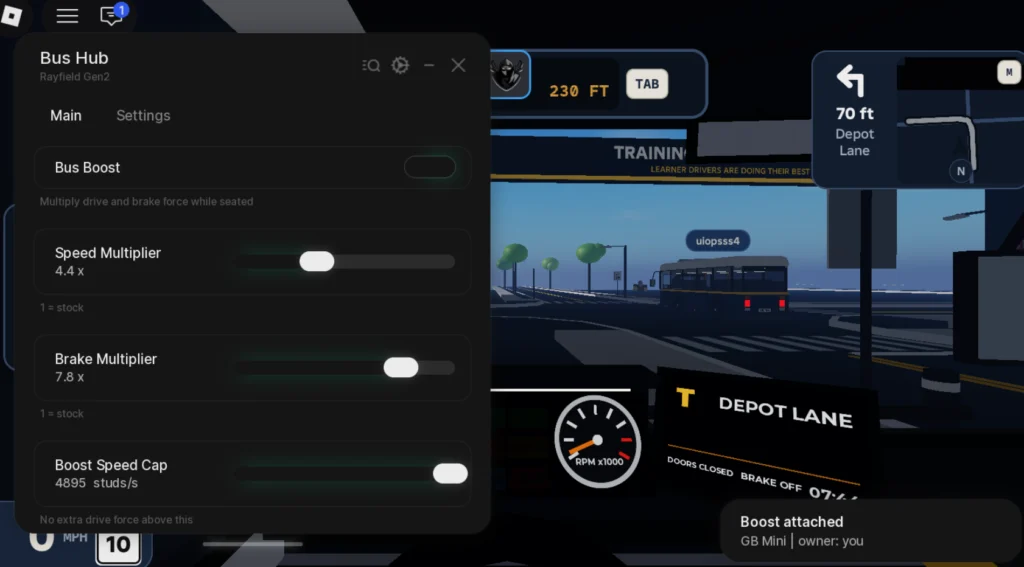
The interface uses the Rayfield Gen2 layout with Main and Settings tabs. It’s flagged mobile friendly and checked on Delta, Wave, ArceusX, Trigon Evo, Codex and KRNL. Sit in the driver’s seat before you flip anything on: when it hooks up you’ll see a “Boost attached” notice naming your bus and owner.
The five controls
Bus Boost is the master switch, and its own description says it multiplies drive and brake force while you’re seated. Speed Multiplier and Brake Multiplier both run from 1x to 10x, where 1 means stock. Boost Speed Cap sets a ceiling in studs per second, above which no extra drive force is added, and Overspeed Push gives an extra shove past normal top speed.
Questions drivers ask
Will it complete routes for me? No. There’s no auto drive or auto fare option here, only the speed and brake tuning, so you still steer and stop yourself.
Does it work on any bus? It attaches to the bus you’re seated in, and the screenshot shows it on a GB Mini.
Is this the only My Bus script on Delta? Yes, for now, and it’s also Bus Hub’s first upload here.
Route tip: the game hands out S grades for staying on schedule, and a bus doing several times stock speed overshoots stops easily. Raise Brake Multiplier above your Speed Multiplier (the preview runs 4.4x speed with 7.8x brakes) so you can still pull in cleanly at each stop.
loadstring(game:HttpGet("https://raw.githubusercontent.com/NewTabGames/Bus-Hub/refs/heads/main/BusHub.lua"))() Game pageMy Bus 🚌 · 1 script on this siteRoblox ›