
 387 65 No Key
Teleport Script Universal Roblox OP – No Key
Roblox Universal · Roblox No key Mobile friendly Working · Oct 28
Description
OP Hub has made an amazing script for All Roblox Games!! Now you can get the feature to teleport anywhere in the game to win.
Key Features
- Teleportation
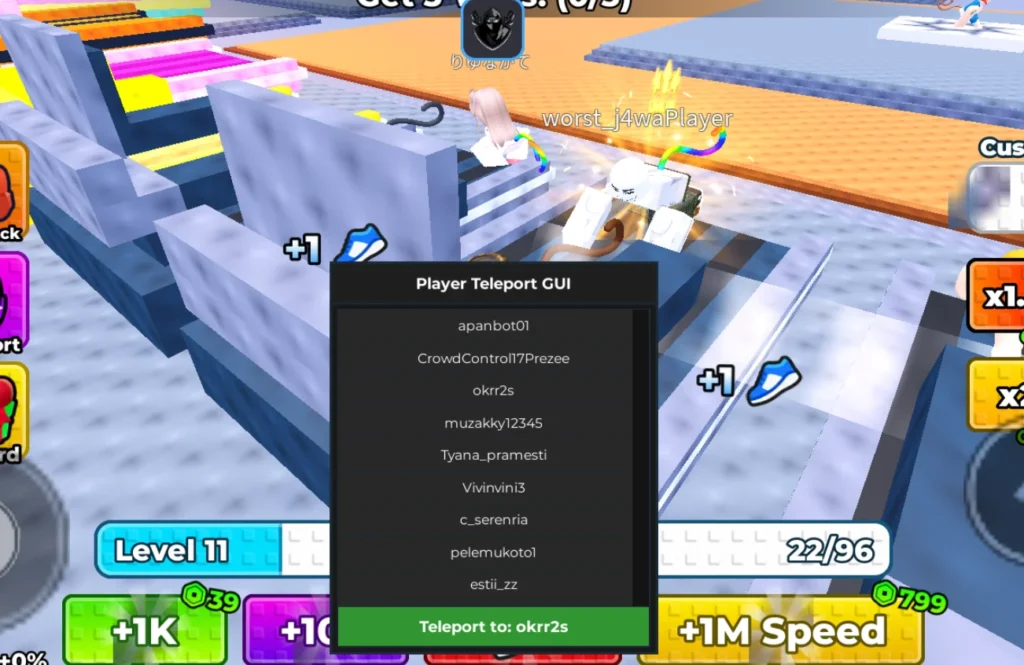
This universal teleport script is pasted in full on the page and builds its own small GUI for choosing where to teleport. It isn't tied to a game and needs no key. Ratings are close at 10 up and 8 down, and the last check was Aug 16.
At a glance
| Game | Roblox Universal (Roblox) |
|---|---|
| Hub / author | OP Hub (@ophub, 35 scripts on this site) |
| Key | No key (as listed) |
| Features listed | 1 |
| Mobile | Listed as mobile friendly |
| Last marked working | Aug 16 |
| Votes | 10 likes / 8 dislikes |
| Other scripts for this game | 75 on this site |
| Executors listed | Delta, KRNL, Codex, ArceusX, Wave, Trigon Evo |
Script
OP Hub
-- Services
local Players = game:GetService("Players")
local UserInputService = game:GetService("UserInputService")
local LocalPlayer = Players.LocalPlayer
local teleportTarget = nil

-- Create GUI
local ScreenGui = Instance.new("ScreenGui")
ScreenGui.Parent = game.CoreGui

local Frame = Instance.new("Frame")
Frame.Size = UDim2.new(0, 250, 0, 300)
Frame.Position = UDim2.new(0.5, -125, 0.4, 0)
Frame.BackgroundColor3 = Color3.fromRGB(25, 25, 25)
Frame.BorderSizePixel = 2
Frame.Parent = ScreenGui

local Title = Instance.new("TextLabel")
Title.Size = UDim2.new(1, 0, 0, 30)
Title.BackgroundColor3 = Color3.fromRGB(30, 30, 30)
Title.Text = "Player Teleport GUI"
Title.TextColor3 = Color3.fromRGB(255, 255, 255)
Title.Font = Enum.Font.GothamBold
Title.TextSize = 14
Title.Parent = Frame

-- Scrolling list
local ScrollingFrame = Instance.new("ScrollingFrame")
ScrollingFrame.Size = UDim2.new(1, -10, 1, -70)
ScrollingFrame.Position = UDim2.new(0, 5, 0, 35)
ScrollingFrame.CanvasSize = UDim2.new(0, 0, 5, 0)
ScrollingFrame.BackgroundColor3 = Color3.fromRGB(20, 20, 20)
ScrollingFrame.Parent = Frame

local UIListLayout = Instance.new("UIListLayout")
UIListLayout.Parent = ScrollingFrame
UIListLayout.SortOrder = Enum.SortOrder.LayoutOrder

-- TP Button
local TPButton = Instance.new("TextButton")
TPButton.Size = UDim2.new(1, -10, 0, 30)
TPButton.Position = UDim2.new(0, 5, 1, -35)
TPButton.BackgroundColor3 = Color3.fromRGB(50, 150, 50)
TPButton.Text = "Teleport"
TPButton.TextColor3 = Color3.fromRGB(255, 255, 255)
TPButton.Font = Enum.Font.GothamBold
TPButton.TextSize = 14
TPButton.Parent = Frame

-- Update player list function
local function updatePlayerList()
    for _, child in pairs(ScrollingFrame:GetChildren()) do
        if child:IsA("TextButton") then
            child:Destroy()
        end
    end
    for _, player in pairs(Players:GetPlayers()) do
        if player ~= LocalPlayer then
            local PlayerButton = Instance.new("TextButton")
            PlayerButton.Size = UDim2.new(1, 0, 0, 25)
            PlayerButton.Text = player.Name
            PlayerButton.TextColor3 = Color3.fromRGB(255, 255, 255)
            PlayerButton.BackgroundColor3 = Color3.fromRGB(40, 40, 40)
            PlayerButton.Font = Enum.Font.Gotham
            PlayerButton.TextSize = 12
            PlayerButton.Parent = ScrollingFrame

            PlayerButton.MouseButton1Click:Connect(function()
                teleportTarget = player.Character and player.Character:FindFirstChild("HumanoidRootPart")
                TPButton.Text = "Teleport to: " .. player.Name
            end)
        end
    end
end

-- Teleport function
TPButton.MouseButton1Click:Connect(function()
    if teleportTarget then
        LocalPlayer.Character:FindFirstChild("HumanoidRootPart").CFrame = teleportTarget.CFrame + Vector3.new(0, 3, 0)
    end
end)

-- Update list on player join/leave
Players.PlayerAdded:Connect(updatePlayerList)
Players.PlayerRemoving:Connect(updatePlayerList)
updatePlayerList()

-- Dragging the GUI
local dragging, dragInput, dragStart, startPos
Title.InputBegan:Connect(function(input)
    if input.UserInputType == Enum.UserInputType.MouseButton1 then
        dragging = true
        dragStart = input.Position
        startPos = Frame.Position
    end
end)

Title.InputChanged:Connect(function(input)
    if input.UserInputType == Enum.UserInputType.MouseMovement then
        dragInput = input
    end
end)

UserInputService.InputChanged:Connect(function(input)
    if input == dragInput and dragging then
        local delta = input.Position - dragStart
        Frame.Position = UDim2.new(startPos.X.Scale, startPos.X.Offset + delta.X, startPos.Y.Scale, startPos.Y.Offset + delta.Y)
    end
end)

Title.InputEnded:Connect(function(input)
    if input.UserInputType == Enum.UserInputType.MouseButton1 then
        dragging = false
    end
end)
How to set it up
- Open Roblox Universal in Roblox and wait until your character has loaded.
- Paste the OP Hub loader into Delta (or another listed executor) and run it.
- Main automation: turn on Teleportation.
Features explained
Main automation. Teleportation.
FAQ
Does OP Hub's Roblox Universal script need a key?
No. The page lists it as No Key.
Are there other Roblox Universal scripts?
Yes, 75 more are listed, including Tero Wall (Show Enemies), No Key and No Key, Enable Highlights, OP. They're linked below.
Does it work on mobile?
The page marks it as mobile friendly, and mobile executors such as Delta, Codex and ArceusX are on the tested list.
More scripts
Tested With
DeltaKRNLCodexArceusXWaveTrigon Evo
Script CodeOP Hub
-- Services
local Players = game:GetService("Players")
local UserInputService = game:GetService("UserInputService")
local LocalPlayer = Players.LocalPlayer
local teleportTarget = nil
-- Create GUI
local ScreenGui = Instance.new("ScreenGui")
ScreenGui.Parent = game.CoreGui
local Frame = Instance.new("Frame")
Frame.Size = UDim2.new(0, 250, 0, 300)
Frame.Position = UDim2.new(0.5, -125, 0.4, 0)
Frame.BackgroundColor3 = Color3.fromRGB(25, 25, 25)
Frame.BorderSizePixel = 2
Frame.Parent = ScreenGui
local Title = Instance.new("TextLabel")
Title.Size = UDim2.new(1, 0, 0, 30)
Title.BackgroundColor3 = Color3.fromRGB(30, 30, 30)
Title.Text = "Player Teleport GUI"
Title.TextColor3 = Color3.fromRGB(255, 255, 255)
Title.Font = Enum.Font.GothamBold
Title.TextSize = 14
Title.Parent = Frame
-- Scrolling list
local ScrollingFrame = Instance.new("ScrollingFrame")
ScrollingFrame.Size = UDim2.new(1, -10, 1, -70)
ScrollingFrame.Position = UDim2.new(0, 5, 0, 35)
ScrollingFrame.CanvasSize = UDim2.new(0, 0, 5, 0)
ScrollingFrame.BackgroundColor3 = Color3.fromRGB(20, 20, 20)
ScrollingFrame.Parent = Frame
local UIListLayout = Instance.new("UIListLayout")
UIListLayout.Parent = ScrollingFrame
UIListLayout.SortOrder = Enum.SortOrder.LayoutOrder
-- TP Button
local TPButton = Instance.new("TextButton")
TPButton.Size = UDim2.new(1, -10, 0, 30)
TPButton.Position = UDim2.new(0, 5, 1, -35)
TPButton.BackgroundColor3 = Color3.fromRGB(50, 150, 50)
TPButton.Text = "Teleport"
TPButton.TextColor3 = Color3.fromRGB(255, 255, 255)
TPButton.Font = Enum.Font.GothamBold
TPButton.TextSize = 14
TPButton.Parent = Frame
-- Update player list function
local function updatePlayerList()
for _, child in pairs(ScrollingFrame:GetChildren()) do
if child:IsA("TextButton") then
child:Destroy()
end
end
for _, player in pairs(Players:GetPlayers()) do
if player ~= LocalPlayer then
local PlayerButton = Instance.new("TextButton")
PlayerButton.Size = UDim2.new(1, 0, 0, 25)
PlayerButton.Text = player.Name
PlayerButton.TextColor3 = Color3.fromRGB(255, 255, 255)
PlayerButton.BackgroundColor3 = Color3.fromRGB(40, 40, 40)
PlayerButton.Font = Enum.Font.Gotham
PlayerButton.TextSize = 12
PlayerButton.Parent = ScrollingFrame
PlayerButton.MouseButton1Click:Connect(function()
teleportTarget = player.Character and player.Character:FindFirstChild("HumanoidRootPart")
TPButton.Text = "Teleport to: " .. player.Name
end)
end
end
end
-- Teleport function
TPButton.MouseButton1Click:Connect(function()
if teleportTarget then
LocalPlayer.Character:FindFirstChild("HumanoidRootPart").CFrame = teleportTarget.CFrame + Vector3.new(0, 3, 0)
end
end)
-- Update list on player join/leave
Players.PlayerAdded:Connect(updatePlayerList)
Players.PlayerRemoving:Connect(updatePlayerList)
updatePlayerList()
-- Dragging the GUI
local dragging, dragInput, dragStart, startPos
Title.InputBegan:Connect(function(input)
if input.UserInputType == Enum.UserInputType.MouseButton1 then
dragging = true
dragStart = input.Position
startPos = Frame.Position
end
end)
Title.InputChanged:Connect(function(input)
if input.UserInputType == Enum.UserInputType.MouseMovement then
dragInput = input
end
end)
UserInputService.InputChanged:Connect(function(input)
if input == dragInput and dragging then
local delta = input.Position - dragStart
Frame.Position = UDim2.new(startPos.X.Scale, startPos.X.Offset + delta.X, startPos.Y.Scale, startPos.Y.Offset + delta.Y)
end
end)
Title.InputEnded:Connect(function(input)
if input.UserInputType == Enum.UserInputType.MouseButton1 then
dragging = false
end
end) Game pageRoblox Universal · 76 scripts on this siteRoblox ›
More Roblox Universal scripts
See all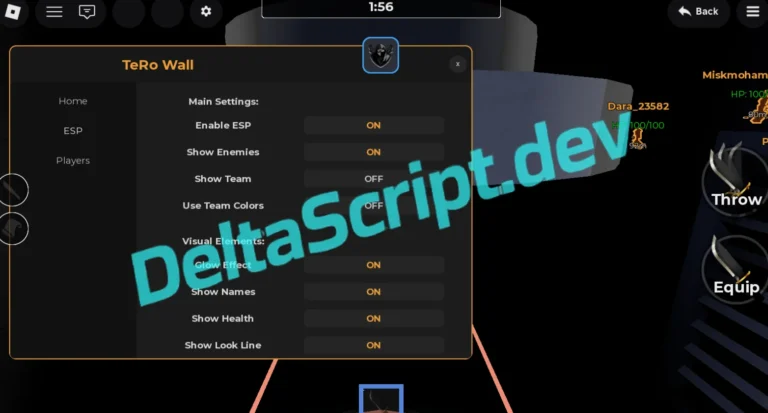
Get Delta Script first on GoogleAdd us as a preferred source to see our new scripts in your Google results.
Add Delta Script on Google
Θέλω να χακαρο το roblox
Pls
We want delta