 8 No Key
Swap Shot! Script (Delta Mobile) – DICEHUB ESP: Weapon Chams, Name Tags
Swap Shot! · RobloxDescription
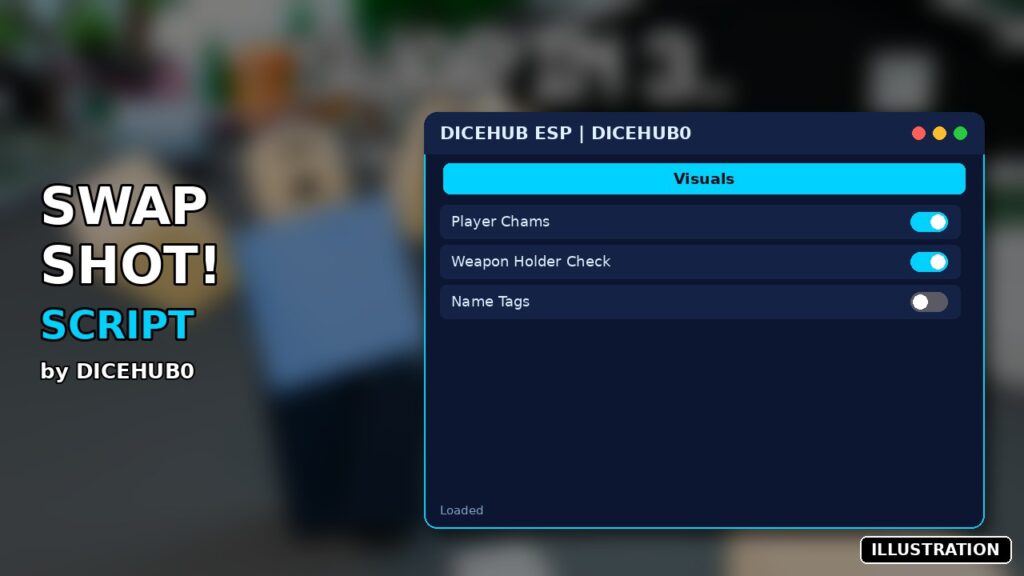
DICEHUB ESP is a Swap Shot! script you can run in Delta on Android, iOS or PC. It includes player chams, weapon holder check, name tags and more. It has no menu and starts as soon as you run it. Created by DICEHUB0. No key.
Key Features
- Player chams: red for players with a gun or knife, blue for others
- Name tags over players
In Swap Shot! the gun belongs to someone new every 15 seconds. The Hunter has that long to land a shot, Runners just try to stay alive, and even the dead get abilities to sabotage. DICEHUB0’s Swap Shot script answers the one question that matters each round: who has the weapon right now?
What you’ll see
- Red outline and fill: a player holding a gun or knife. The script checks equipped tools for parts like Ammo, Clip, GunScript or Muzzle, or for names containing words like Gun, Pistol, Knife or Blade.
- Blue: everyone without a weapon in hand.
- Name tags: each player’s username floats above their head in the same colour.
Highlights and tags draw on top of walls and update every frame, so colours change the moment the gun swaps.
Running DICEHUB ESP
There’s nothing to configure. Copy the short script from the code box (about 110 lines, with Thai comments), run it in Delta and it starts right away. There’s no window, no key and no internet request. Players who join later are picked up automatically. Fluxus or Codex work as alternatives on the listing, and Arceus X or a PC executor are fine as well. To turn it off, leave and rejoin the server, because the script has no stop button.
FAQ
Does it show the Hunter when they’re a Runner again? Colour follows the tool, not the role. As soon as the gun leaves someone’s hands they turn blue.
Does it aim or shoot for me? No. It’s a visual ESP only. Shooting (LMB), aiming (RMB) and your skills (F) are all manual.
Will it break with game updates? The game is in beta and changes are expected. If a renamed weapon stops turning red, add its name to the keyword list at the top of the code.
Survival tip: when you’re a Runner, keep a wall between you and the red outline and count down the 15 seconds. Once the swap hits, the colours tell you instantly whether you’re now the one hunting.
-- ESP Chams & NameTag System (Red = Has Gun or Knife, Blue = No Weapon)
local Players = game:GetService("Players")
local RunService = game:GetService("RunService")
local LocalPlayer = Players.LocalPlayer
-- รายการคีย์เวิร์ดสำหรับตรวจสอบอาวุธ (ทั้งปืนและมีด/อาวุธประชิด)
local weaponKeywords = {
-- ปืน
"Gun", "Rifle", "Pistol", "Shotgun", "Sniper", "SMG", "Blaster", "Weapon", "Firearm", "AK47", "M4A1", "Glock",
-- มีด / อาวุธประชิด
"Knife", "Blade", "Dagger", "Sword", "Melee", "Karambit", "Bayonet", "Cutter"
}
local function isThreatWeapon(tool)
if not tool or not tool:IsA("Tool") then return false end
-- ตรวจสอบองค์ประกอบมาตรฐานของปืน (ถ้ามี)
if tool:FindFirstChild("Ammo") or tool:FindFirstChild("Clip") or tool:FindFirstChild("GunScript") or tool:FindFirstChild("Muzzle") then
return true
end
-- ตรวจสอบชื่อ Tool กับคีย์เวิร์ดของปืนและมีด
local toolName = tool.Name:lower()
for _, keyword in ipairs(weaponKeywords) do
if string.find(toolName, keyword:lower()) then
return true
end
end
return false
end
local function setupESP(player)
if player == LocalPlayer then return end
local function hasWeapon(char)
if not char then return false end
for _, child in ipairs(char:GetChildren()) do
if child:IsA("Tool") and isThreatWeapon(child) then
return true
end
end
return false
end
local function updateESP()
local char = player.Character
if not char or not char:FindFirstChild("HumanoidRootPart") or not char:FindFirstChild("Head") then
if char then
local hl = char:FindFirstChild("ChamsHighlight")
if hl then hl:Destroy() end
local tag = char.Head:FindFirstChild("ESPNameTag")
if tag then tag:Destroy() end
end
return
end
local holdingWeapon = hasWeapon(char)
local chamColor = holdingWeapon and Color3.fromRGB(255, 0, 0) or Color3.fromRGB(0, 0, 255)
local highlight = char:FindFirstChild("ChamsHighlight")
if not highlight then
highlight = Instance.new("Highlight")
highlight.Name = "ChamsHighlight"
highlight.Adornee = char
highlight.DepthMode = Enum.HighlightDepthMode.AlwaysOnTop
highlight.Parent = char
end
highlight.FillColor = chamColor
highlight.OutlineColor = chamColor
highlight.FillTransparency = 0.45
highlight.OutlineTransparency = 0.1
local head = char.Head
local nameTag = head:FindFirstChild("ESPNameTag")
if not nameTag then
nameTag = Instance.new("BillboardGui")
nameTag.Name = "ESPNameTag"
nameTag.Size = UDim2.new(0, 120, 0, 50)
nameTag.StudsOffset = Vector3.new(0, 2.5, 0)
nameTag.AlwaysOnTop = true
local textLabel = Instance.new("TextLabel")
textLabel.Name = "NameText"
textLabel.Size = UDim2.new(1, 0, 1, 0)
textLabel.BackgroundTransparency = 1
textLabel.TextScaled = true
textLabel.Font = Enum.Font.FredokaOne
textLabel.TextStrokeTransparency = 0
textLabel.TextStrokeColor3 = Color3.fromRGB(0, 0, 0)
textLabel.Parent = nameTag
nameTag.Parent = head
end
local textLabel = nameTag:FindFirstChild("NameText")
if textLabel then
textLabel.Text = player.Name
textLabel.TextColor3 = chamColor
end
end
RunService.RenderStepped:Connect(updateESP)
end
for _, player in ipairs(Players:GetPlayers()) do
setupESP(player)
end
Players.PlayerAdded:Connect(function(player)
setupESP(player)
end)
print("ESP Chams System (Gun & Knife) Loaded Successfully!") Game pageSwap Shot! · 1 script on this siteRoblox ›